

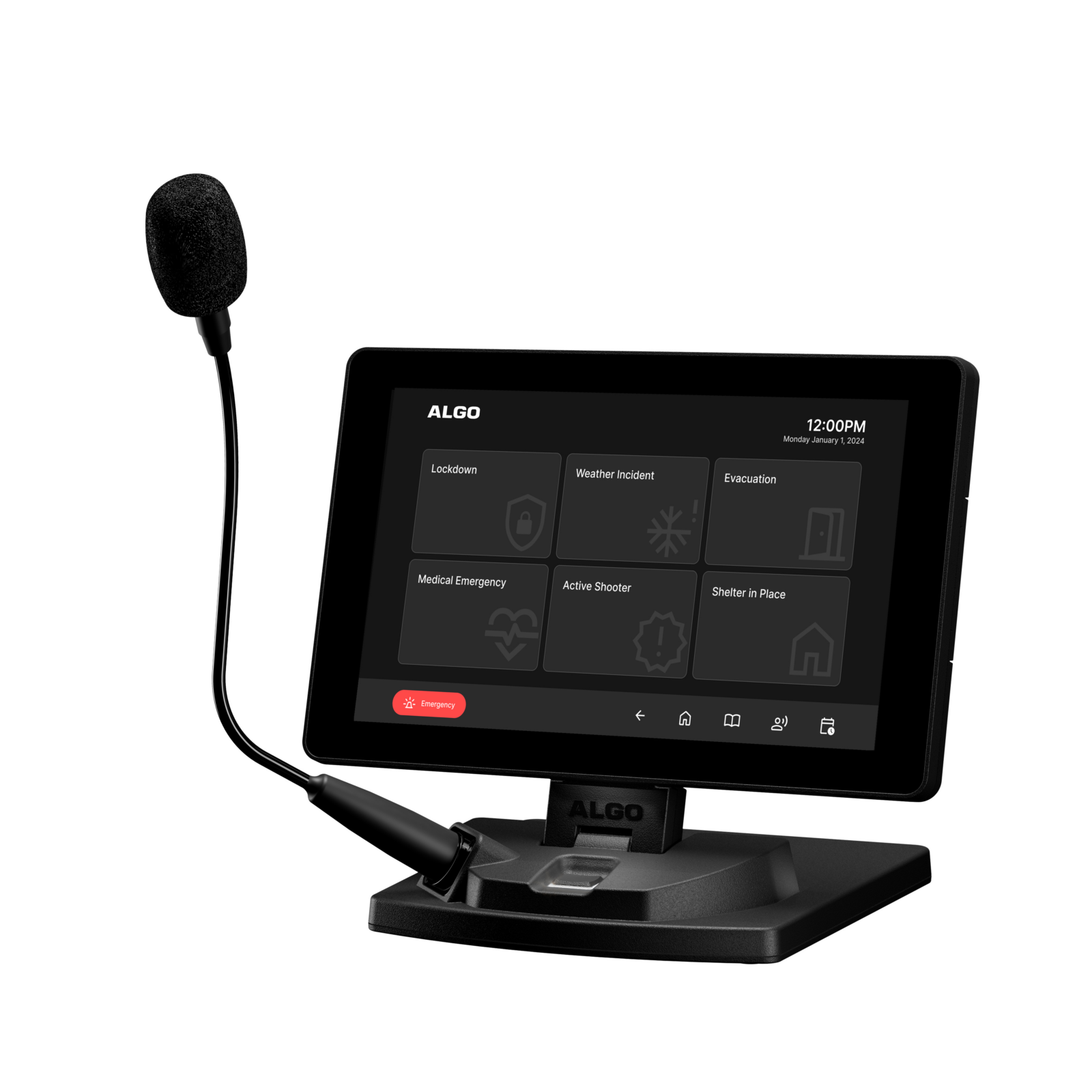
Paging Systems for Lockdown & Active-Shooter Response
Table of Contents
- Why Lockdown Communication Capability Matters
- How a Lockdown Paging System Works
- Types of Lockdown Communication Systems
- Key Benefits for Emergency Response
- Drawbacks and Limitations to Understand
- Best Practices for Lockdown Paging Design
- How to Choose the Right System for Your Facility
- Lockdown System Comparison Table
- Cost and Pricing Overview
- Frequently Asked Questions
- Conclusion
- References
Introduction
There is no communication scenario more time-critical than an active threat inside a facility. In the seconds after a lockdown is declared, every person in the building needs the same information at the same time — without ambiguity, without delay, and without depending on a single person's composure under extreme stress to deliver it correctly.
This guide addresses a serious and sensitive topic directly and factually. Its purpose is to help Texas facility managers, school administrators, and security directors understand how paging system technology supports lockdown and active threat communication protocols — not to provide tactical guidance on responding to an active threat itself. For protocol development and staff training, work with your local law enforcement agency, a certified school safety consultant, or your organization's emergency management team.
From a technology standpoint, a properly designed paging system is one component of a layered emergency communication strategy — working alongside access control, law enforcement notification, and staff training to support a coordinated response when every second matters.
📞 Get a Free Safety Communication Assessment
Nexlar Security offers FREE on-site consultations for Texas schools, businesses, and institutions. Our licensed team evaluates your facility's emergency communication capability and designs systems that support your safety protocols. 👉 Book Your Free Site Survey Today
Why Lockdown Communication Capability Matters
Emergency communication research and after-action reviews of real incidents consistently identify the same pattern: facilities with automated, pre-programmed emergency communication respond faster and more consistently than facilities relying on a staff member to manually announce a threat over a standard intercom in real time.
There are clear reasons for this. In a genuine emergency, the person closest to the situation is often the least equipped to deliver a calm, accurate, complete announcement — they may be in danger themselves, uncertain of the exact nature of the threat, or simply too affected by the stress of the moment to communicate clearly. A pre-programmed lockdown announcement, triggered by a single button press, removes the requirement for that person to find the right words in the moment. They only need to trigger the alert — the system delivers the message.
Beyond the immediate announcement, a properly designed system supports the broader protocol: alerting every zone of the building simultaneously, providing consistent and complete instructions regardless of who triggers the alert, and — when integrated with access control systems — coordinating physical security responses like door locking alongside the communication.
This is not a feature schools and businesses should treat as optional. It is foundational safety infrastructure, and it deserves the same rigor in planning, testing, and maintenance as fire alarm systems receive.
How a Lockdown Paging System Works
A lockdown-capable paging system is built around the principle of immediate, reliable, pre-programmed activation — minimizing the steps and decisions required between recognizing a threat and alerting the building.
Trigger Activation A lockdown alert can be initiated through several mechanisms, often deployed in combination for redundancy: physical panic buttons mounted in classrooms, offices, and other key locations; a software trigger on an authorized computer, tablet, or mobile device; a dedicated mobile app that allows authorized staff to trigger a lockdown from anywhere on or off the physical premises; or, in some integrated systems, automatic triggering from a connected gunshot detection sensor or other automated threat detection technology.
Immediate Broadcast Once triggered, the system immediately plays a pre-recorded, pre-programmed lockdown announcement to all designated zones — typically the entire facility, since a threat's exact location and movement are often unknown at the moment of activation. The message is consistent every time, regardless of who triggered it, and does not depend on anyone composing or speaking the announcement live.
Simultaneous Multi-System Activation In integrated deployments, the same trigger that activates the paging announcement can simultaneously activate other connected systems — locking designated doors through access control integration, notifying law enforcement or a monitoring center, activating visual alerts (strobes or digital signage) for areas where audio alone may not be sufficient, and logging the event with a timestamp for post-incident review.
Status and All-Clear Communication A complete lockdown communication system also supports communicating an all-clear or status update once the situation is resolved or as new information becomes available — typically through the same trigger mechanisms used to initiate the lockdown, configured with a separate all-clear message.
Types of Lockdown Communication Systems
Single-Trigger Facility-Wide Lockdown Paging
The most fundamental configuration: a single button or trigger point activates a pre-recorded lockdown announcement broadcast to every paging zone in the facility simultaneously. This is the minimum baseline capability every facility with a paging system should have, and it requires no advanced integration — only that the paging controller supports a programmable emergency trigger input.
Multi-Point Panic Button Systems
Physical panic buttons installed at multiple locations throughout the facility — classrooms, offices, reception areas, common spaces — each capable of triggering the same facility-wide lockdown announcement. Multiple trigger points increase the likelihood that someone near the threat, or someone who becomes aware of it, can activate the alert quickly, rather than relying on a single trigger location that may not be accessible during the incident.
Mobile and Software-Based Triggering
In addition to or instead of physical buttons, software-based triggers — a desktop application, a dedicated mobile app, or a panic button feature within an existing security management platform — allow authorized staff to trigger a lockdown from any location with appropriate access, including potentially from outside the building if the threat is first observed approaching the facility.
Integrated Access Control and Lockdown Systems
The most comprehensive approach combines paging with access control system integration — a single trigger both broadcasts the lockdown announcement and automatically locks designated doors throughout the facility, reducing the number of separate actions required during a fast-moving, high-stress event.
Zone-Specific Lockdown Protocols
For larger or multi-building campuses, some lockdown systems support both a facility-wide "hold and secure" or full lockdown trigger and the ability to declare zone-specific protocols — for example, a threat confirmed in one building triggering full lockdown there while adjacent buildings follow a different protocol such as shelter-in-place or evacuation away from the affected area, based on the facility's specific emergency operations plan.
Key Benefits for Emergency Response
Consistent, Pre-Programmed Messaging Removes Human Error Under Stress The single greatest advantage of a properly designed lockdown paging system is that it does not depend on a person composing and delivering a clear, complete announcement in the most stressful moment of their professional life. The message is recorded in advance, reviewed for clarity, and triggered instantly — every time, the same way.
Speed of Activation A single button press or software trigger activates the broadcast in seconds — significantly faster than a manual announcement requiring someone to reach a microphone, compose their thoughts, and speak clearly under extreme duress.
Multiple Trigger Points Increase Reliability A system with panic buttons in multiple locations, plus software and mobile triggering options, ensures that the alert can be activated from wherever the threat is first recognized — rather than depending on a single, potentially inaccessible trigger point.
Coordinated Multi-System Response When integrated with access control and security camera systems, a single lockdown trigger can simultaneously lock doors, broadcast the announcement, and provide security personnel with camera access to the relevant area — coordinating the physical and communication response from one action.
Documented Event Logging Automated systems log the exact time of activation, the trigger location, and the duration of the event — supporting after-action review, law enforcement coordination, and continuous improvement of the facility's emergency response protocols.
Supports Staff Training and Drill Consistency Because the system delivers the same message every time, staff and occupants become familiar with exactly what a lockdown announcement sounds like and what it means — improving response time and reducing confusion during both drills and real events.
Drawbacks and Limitations to Understand
Technology Supports, But Does Not Replace, Trained Response Protocols A paging system is a communication tool — it delivers the alert. It does not, by itself, determine what staff and students should do in response, train people on lockdown procedures, or replace coordination with law enforcement. Technology and protocol must be developed together, and protocol development should involve qualified safety professionals and local law enforcement.
System Reliability Depends on Power and Network Redundancy A lockdown paging system that depends on network connectivity or external power without backup is vulnerable to the same outages that could occur during or coincide with an emergency. Battery backup for the paging controller and critical network equipment is an essential design consideration, not an optional add-on.
False Activation Risk Requires Careful Design Multiple trigger points increase reliability but also increase the surface area for accidental activation. Trigger design — button placement, confirmation steps where appropriate, and staff training on proper use — should balance speed of legitimate activation against the operational disruption of false alarms.
Regular Testing and Maintenance Are Mandatory, Not Optional A lockdown system that hasn't been tested recently is a system whose reliability is unknown precisely when it matters most. Regular testing — coordinated with drills, not just technical system checks — is essential and should be a documented, recurring part of the facility's safety program.
No System Eliminates Risk It's important to be direct: no paging system, no matter how well designed, eliminates the risk of an active threat situation or guarantees a specific outcome. These systems are one component of a broader emergency preparedness strategy that must also include trained staff, established protocols, law enforcement coordination, and physical security measures.
Best Practices for Lockdown Paging Design
Work With Law Enforcement and Safety Professionals on Protocol First Before finalizing the technical system design, work with local law enforcement, your school district's safety office, or a certified security consultant to establish your facility's specific lockdown protocol. The technology should be designed to support that protocol — not the other way around.
Install Multiple, Accessible Trigger Points Place physical panic buttons in locations where staff are most likely to be present and able to reach them quickly — classrooms, reception areas, offices — and supplement with software or mobile triggering for additional coverage and flexibility.
Ensure Facility-Wide, Redundant Speaker Coverage A lockdown announcement is only effective if every occupant can hear it clearly. Conduct a thorough acoustic site survey to confirm coverage in every area of the facility, including outdoor areas, stairwells, and any acoustically challenging spaces.
Integrate with Access Control Where Possible Connecting the lockdown trigger to your access control system so that doors lock automatically alongside the announcement significantly strengthens the physical security response and reduces the number of manual actions required during the event.
Build in Power and Network Redundancy Battery backup for the paging controller, redundant network paths where feasible, and regular testing of backup power systems ensure the lockdown capability remains functional even during a power or network disruption.
Pre-Record Clear, Tested Announcement Messages Work with safety professionals to craft lockdown and all-clear messages that are clear, unambiguous, and consistent with your facility's established protocol terminology — and test these recordings for clarity and audibility across your actual speaker coverage before relying on them.
Conduct Regular Drills That Include the Technology Lockdown drills should test the actual triggering mechanism and announcement — not just the response procedure — so that both the technology and the people using it are verified to work correctly together under realistic conditions.
Establish a Recurring Maintenance and Testing Schedule Document a regular schedule for testing trigger points, confirming speaker coverage, verifying backup power function, and reviewing system logs — treating this with the same seriousness as fire alarm system maintenance and testing requirements.
How to Choose the Right System for Your Facility
Start with Your Facility's Established Emergency Protocol The system design should follow from your facility's specific lockdown and emergency response protocol, developed with input from law enforcement and safety professionals — not the reverse.
Assess Your Current Paging System's Emergency Capability If you have an existing paging system, evaluate whether it currently supports a dedicated, instantly accessible emergency trigger separate from routine paging functions, multiple trigger point options, and integration capability with access control.
Prioritize Facility-Wide Coverage Verification Before adding advanced features, confirm that your basic speaker coverage reaches every occupied area of the facility — this is the foundation that every other capability depends on.
Evaluate Integration with Access Control and Camera Systems Determine whether connecting your lockdown trigger to door locking and camera systems is feasible with your current or planned security infrastructure, and prioritize this integration given its significant impact on response effectiveness.
Plan for Power and Network Redundancy from the Start Build battery backup and network reliability into the initial system design rather than treating it as a future upgrade — this capability needs to work during the exact conditions most likely to disrupt normal power and network function.
Work with an Experienced, Licensed Installer Lockdown communication system design requires both technical expertise and an understanding of emergency protocol integration. Nexlar Security holds Texas Low Voltage License# B14634 and has experience designing safety communication systems for schools, businesses, and institutions across Texas.
Lockdown System Comparison Table
| Feature | Basic Single-Trigger | Multi-Point Panic Buttons | Integrated (Access Control + Paging) |
|---|---|---|---|
| Trigger Points | One | Multiple physical locations | Multiple + software/mobile |
| Facility-Wide Broadcast | Yes | Yes | Yes |
| Automatic Door Lockdown | No | No | Yes |
| Mobile/Remote Triggering | No | No | Yes (typical) |
| Camera System Coordination | No | No | Yes (typical) |
| Event Logging | Basic | Basic | Comprehensive |
| Power/Network Redundancy | Recommended | Recommended | Essential |
| Best For | Small facilities, basic capability | Mid-size facilities | Schools, hospitals, larger campuses |
Cost and Pricing Overview
| System Scope | Estimated Cost Range |
|---|---|
| Basic Single-Trigger Lockdown Capability (existing system upgrade) | $1,500 – $5,000 |
| Multi-Point Panic Button Installation (per building) | $3,000 – $10,000 |
| Full Facility-Wide Speaker Coverage Verification + Upgrades | $5,000 – $30,000 |
| Access Control + Paging Integration | $5,000 – $20,000 |
| Comprehensive Integrated System (new deployment, mid-size campus) | $25,000 – $75,000+ |
| Battery Backup / Network Redundancy Add-On | $2,000 – $10,000 |
These estimates reflect equipment, integration, and installation costs for Texas facilities. Actual costs depend on facility size, existing infrastructure, number of trigger points, and integration scope. Nexlar provides detailed, itemized quotes after every free on-site safety communication assessment.
💡 Ensure Your Facility Can Respond in Seconds, Not Minutes
Nexlar designs lockdown-capable paging and access control integration for Texas schools and businesses — built around your established emergency protocols and tested for reliability. 👉 Schedule Your Free On-Site Survey Today
Frequently Asked Questions
Q: What is a lockdown paging system?
A: A lockdown paging system is a paging platform configured with a dedicated emergency trigger — such as a panic button, software interface, or mobile app — that immediately broadcasts a pre-recorded lockdown announcement to all designated zones in a facility. This removes the need for someone to manually compose and deliver a spoken announcement during a high-stress emergency, ensuring a consistent, immediate alert to every occupant.
Q: How fast does a lockdown announcement play after the trigger is activated?
A: A properly designed lockdown paging system broadcasts the pre-recorded announcement within seconds of trigger activation — typically faster than a person could reach a microphone and speak under normal conditions, and significantly faster and more reliable than expecting someone to compose a clear announcement during an active emergency.
Q: Can a lockdown paging system automatically lock doors as well?
A: Yes, when integrated with an access control system. A single lockdown trigger can be configured to simultaneously broadcast the paging announcement and send a signal to the access control platform to lock designated doors throughout the facility — coordinating the communication and physical security response from one action rather than requiring separate manual steps for each.
Q: How many panic button trigger points should a facility have?
A: The right number and placement of trigger points depends on the facility's size, layout, and established emergency protocol — which should be developed with input from law enforcement and safety professionals. As a general principle, trigger points should be placed in locations where staff are most likely to be present and able to reach them quickly, such as classrooms, offices, and reception areas, with multiple points reducing the risk of the alert being inaccessible during an actual event.
Q: Does a lockdown paging system replace the need for staff training and emergency protocols?
A: No. A lockdown paging system is a communication tool that delivers a consistent, immediate alert — it does not determine appropriate response actions, train staff and occupants on lockdown procedures, or coordinate with law enforcement on its own. Technology must work alongside trained staff, established protocols developed with safety professionals, and regular drills as part of a complete emergency preparedness strategy.
Q: What happens to a lockdown paging system if the power or network goes out?
A: This depends entirely on whether the system was designed with power and network redundancy. A properly designed lockdown communication system includes battery backup for the paging controller and, where feasible, redundant network paths for critical components — ensuring the system remains functional during a power or network disruption. This redundancy should be a standard part of system design, not an optional add-on, given how critical this capability is.
Q: How often should a lockdown paging system be tested?
A: Lockdown paging systems should be tested on a regular, documented schedule — ideally coordinated with the facility's lockdown drills so that both the technology and the human response procedures are verified together under realistic conditions. The specific frequency should align with your facility's broader safety and drill schedule, often established in coordination with school district policy, local fire code requirements, or organizational safety standards.
Conclusion: Technology That Supports — But Never Replaces — Trained Response
A well-designed lockdown paging system removes one of the most significant points of failure in emergency response: the dependency on a person delivering a clear, accurate, complete announcement in the most stressful possible moment. By pre-programming the message and minimizing the steps between recognizing a threat and alerting the building, the technology gives every occupant the same critical seconds of advance notice — seconds that matter.
But technology alone is never the complete answer. A lockdown paging system must be built around an established emergency protocol developed with law enforcement and safety professionals, supported by regular drills and staff training, and maintained with the same rigor as any other life-safety system in the building.
Nexlar Security designs and installs lockdown-capable paging systems, integrated with access control and security cameras, for schools, businesses, and institutions across Houston, Dallas, San Antonio, Austin, Fort Worth, and San Marcos. Our licensed team (License# B14634) works alongside your safety leadership to design a system that supports — and never substitutes for — your established emergency protocols.
Book your FREE on-site consultation today and let Nexlar help strengthen your facility's emergency communication capability.
References
- NFPA 72 — National Fire Alarm and Signaling Code (2022 Edition), Chapter 24: Emergency Communications Systems
- U.S. Department of Education — Guide for Developing High-Quality School Emergency Operations Plans
- Texas School Safety Center (TxSSC) — School Safety and Security Guidelines
- Cybersecurity and Infrastructure Security Agency (CISA) — Active Shooter Preparedness Resources
- OSHA 1910.165 — Employee Alarm Systems Standard
- Texas Department of Licensing and Regulation (TDLR) — Low Voltage Contractor Licensing
- Nexlar Security — Access Control Systems: nexlar.com/access-control-systems
- Nexlar Security — Educational Security Systems: nexlar.com/education-security
Follow Us