

Paging System Installation: Step-by-Step Process Explained
Table of Contents
- What Is Paging System Installation?
- How the Paging System Installation Process Works Step by Step
- Types of Paging System Installations
- Key Benefits of Professional Installation
- Common Installation Mistakes and How to Avoid Them
- Industries That Require Specialized Installation
- How to Prepare Your Facility for Installation
- Installation Timeline Comparison by System Type
- Paging System Installation Cost Overview
- Frequently Asked Questions
- Conclusion
- References
Introduction
Installing a commercial paging system isn't as simple as plugging in a speaker and pressing go. A properly installed system requires careful planning, precise engineering, and methodical execution — from the initial site survey all the way through final testing and staff training.
When installation is done right, your paging system works reliably from day one and continues performing for years. When it's done wrong, you get poor audio coverage, dead zones, failed integrations, and ongoing service calls that cost more than the original installation.
This guide walks you through exactly how professional commercial paging system installation works — step by step — so you know what to expect, what questions to ask, and why working with a licensed installer like Nexlar Security makes all the difference for your Texas business.
📞 Start with a FREE On-Site Survey
Before any installation begins, Nexlar's licensed team visits your facility, assesses your needs, and designs the right system. No cost, no commitment. 👉 Book Your Free Site Survey Today
What Is Paging System Installation?
Paging system installation is the end-to-end process of designing, sourcing, mounting, wiring, configuring, integrating, and testing a commercial audio communication system within a business facility.
It encompasses far more than simply hanging speakers on a ceiling. A proper installation project covers acoustic planning to determine speaker placement, cable routing to ensure clean signal delivery, controller configuration to set up zones and schedules, integration with other systems such as access control or fire alarms, and final commissioning to verify that every component of the system performs exactly as designed.
In Texas, commercial paging system installation must be performed by a licensed low-voltage contractor. Nexlar Security holds Texas Low Voltage License# B14634 and is fully licensed and insured for all commercial paging installations across the state.
The quality of the installation determines the quality of the system's performance. A poorly installed system — regardless of the quality of its components — will deliver inconsistent coverage, integration failures, and long-term reliability problems. That's why the installer you choose matters as much as the equipment you buy.
How the Paging System Installation Process Works Step by Step
Every Nexlar paging system installation follows a structured, proven process designed to deliver reliable results from the first day of operation.
Step 1: Free On-Site Assessment and Needs Analysis
The process begins with a comprehensive site visit. Nexlar's licensed consultants walk every area of your facility, map the floor plan, identify ambient noise levels, document your existing infrastructure, and understand your specific communication goals.
During this visit, the team asks the key questions: What zones do you need? Do you have existing speaker infrastructure? What security systems will the paging platform need to integrate with? Do you have outdoor areas that require weatherproof coverage?
This assessment is the foundation of everything that follows. It eliminates guesswork and ensures the system design matches your real operational needs — not a generic template.
Step 2: System Design and Engineering
Based on the site assessment, Nexlar's team produces a detailed system design. This includes an acoustic coverage plan showing speaker placement and coverage patterns, a wiring and cable routing diagram, zone configuration architecture, integration specifications for any connected systems, and a complete equipment list.
For IP paging systems, this stage also includes a network readiness review — evaluating your existing LAN infrastructure, PoE switch capacity, VLAN requirements, and QoS settings. If upgrades are needed, they're identified here with full transparency before any work begins.
The system design is reviewed with you before any equipment is ordered or installation begins. You understand exactly what will be installed, where, and why.
Step 3: Equipment Procurement
Once the design is approved, Nexlar sources the specified equipment directly from trusted manufacturers and distribution partners. Every component — speakers, controllers, amplifiers, IP endpoints, PoE switches, cabling, and accessories — is verified against the system design before delivery to your facility.
Using commercial-grade equipment from reputable manufacturers ensures your system performs reliably and that warranty support is available if any component fails.
Step 4: Cable Routing and Infrastructure Preparation
Before a single speaker is mounted, the cabling infrastructure is prepared. For analog systems, dedicated speaker cabling is routed from the central amplifier location to each speaker position — typically through conduit, cable trays, or above ceiling tile pathways.
For IP paging systems, the team verifies existing network cabling routes, installs any new Cat5e or Cat6 runs required for speaker endpoints, and upgrades or installs PoE network switches where needed.
Cable routing is one of the most labor-intensive stages of any installation. Doing it correctly — with proper cable management, labeling, and protection — is critical for long-term reliability and future serviceability.
Step 5: Speaker and Hardware Mounting
With cabling in place, the physical installation of speakers, controllers, microphones, and ancillary hardware begins. Ceiling speakers are cut in or surface-mounted based on ceiling type, with each unit positioned according to the acoustic coverage plan developed in Step 2.
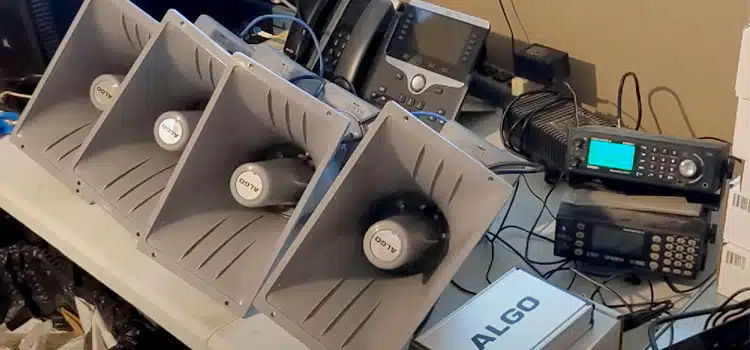
For outdoor installations, weatherproof horn units or IP-rated enclosure speakers are mounted on building exteriors, light poles, or wall brackets using corrosion-resistant hardware appropriate for Texas weather conditions.
Amplifiers, IP controllers, and network equipment are mounted in designated rack spaces or equipment rooms with proper ventilation, power conditioning, and physical security.
Step 6: System Configuration and Zone Programming
Once all hardware is installed and wired, the technical configuration begins. For analog systems, this involves setting amplifier levels, configuring zone routing, and testing signal paths.
For IP paging systems, this is a more comprehensive process: IP addresses are assigned to each endpoint, zones are created and mapped in the management software, user permissions are configured, and any automation rules — scheduled broadcasts, event triggers, emergency protocols — are programmed and tested.
Integration with other systems is configured at this stage. If the paging system is connected to security cameras, access control platforms, or fire alarm systems, the integration points are configured, tested, and verified for correct trigger behavior.
Step 7: Full System Testing and Commissioning
Before the system is handed over, it undergoes rigorous testing across every zone, every endpoint, and every integrated function. The team verifies audio coverage and volume levels in each zone, tests all scheduled and manual broadcast functions, confirms all automated event triggers operate as designed, tests emergency alert protocols end to end, and documents the results.
Any issues identified during commissioning are corrected before the project is considered complete. Nexlar does not sign off on an installation until every component performs exactly as specified.
Step 8: Staff Training and Documentation
Once the system is commissioned, Nexlar's team conducts hands-on training with the staff who will operate the system daily. This covers basic paging operations, zone selection, schedule management, emergency procedures, and basic troubleshooting.
Complete system documentation — including wiring diagrams, zone maps, equipment manuals, and configuration records — is provided to your team so that future maintenance, expansions, or troubleshooting can be handled efficiently.
Step 9: Post-Installation Support and Maintenance
Nexlar's relationship with your business doesn't end at installation. Ongoing maintenance plans keep your system performing reliably year-round with scheduled health checks, software updates for IP systems, speaker and amplifier inspections, and rapid response to any service needs that arise.
Types of Paging System Installations
New Construction Installation
Paging systems installed in new buildings or during a renovation are the most straightforward and cost-effective. Cable routing, conduit placement, and equipment locations can be planned before walls and ceilings are closed — minimizing labor and maximizing flexibility in system design.
Retrofit Installation
Retrofit installations add paging capability to an existing building without a major renovation. This requires more careful cable routing through existing ceilings and walls, and may use wireless components or existing conduit pathways to minimize disruption to the facility's operations.
Expansion of Existing Systems
Many Texas businesses start with a basic paging system and expand as they grow. For IP systems, expansion is straightforward — add network endpoints and configure them in software. For analog systems, expansion requires new dedicated cabling to each additional speaker location.
Multi-Site Installation
For Texas businesses managing facilities across Houston, Dallas, San Antonio, Austin, and other cities, Nexlar manages multi-site installations as coordinated projects — ensuring consistent design standards, unified management platforms, and seamless cross-site communication.
Outdoor Installation
Outdoor paging installations require weatherproof, IP-rated equipment and cable routing methods that protect against heat, UV exposure, moisture, and physical damage. Texas climate conditions make proper equipment selection and mounting especially critical.
Key Benefits of Professional Installation
Accurate Coverage from Day One — A professionally designed and installed system eliminates dead zones and inconsistent coverage. Every zone sounds clear and consistent because placement was engineered, not guessed.
Compliance with Texas Licensing Requirements — Commercial low-voltage installations in Texas must be performed by a licensed contractor. Nexlar's License# B14634 ensures your installation meets all state requirements.
Integration That Actually Works — Connecting a paging system to access control, security cameras, or fire alarms is only valuable if the integration is configured correctly. Professional installation ensures every integration point is tested and verified.
Warranty Protection — Most equipment manufacturers require professional installation to honor their product warranties. DIY or unlicensed installation can void your coverage and leave you exposed to repair costs.
Long-Term Reliability — Proper cable management, correct amplifier settings, and careful configuration during installation directly determine how reliably the system performs over time.
Common Installation Mistakes and How to Avoid Them
Incorrect Speaker Placement — Placing speakers too far apart creates dead zones. Too close together causes audio overlap and echo. Proper acoustic planning during the design phase prevents this entirely.
Undersized Amplifiers — Using an amplifier that isn't rated for the total speaker load leads to poor audio quality and premature equipment failure. Always ensure your amplifier capacity matches your speaker system.
Ignoring Ambient Noise Levels — In loud industrial environments, standard speakers don't cut through background noise. High-output speakers or horn units are required in warehouses, manufacturing plants, and outdoor areas.
Skipping Network Assessment for IP Systems — Installing an IP paging system on an unprepared network leads to audio quality issues, latency problems, and dropped connections. Network readiness assessment is a non-negotiable first step.
No Zoning for Large Facilities — Installing a single-zone system in a large or multi-department facility creates unnecessary noise disruption and limits communication effectiveness. Zone planning is essential for any facility over 10,000 sq. ft.
Industries That Require Specialized Installation
Certain industries have unique requirements that make specialized installation knowledge essential:
Healthcare — Hospital paging installations must account for HIPAA communication requirements, integration with nurse call systems, code alert automation, and extremely high reliability standards. Nexlar's healthcare security solutions incorporate these requirements into every medical facility project.
Education — School installations must include bell schedule automation, emergency lockdown capability, and integration with access control for campus-wide security. Nexlar's educational security systems address all of these requirements.
Government — Government facilities require licensed contractors, compliance with specific communication standards, and documentation of the complete installation for records purposes.
Industrial and Manufacturing — High-ambient-noise environments require specifically rated equipment, correct placement to penetrate noise levels, and careful acoustic planning.
How to Prepare Your Facility for Installation
Provide Access to All Areas — Ensure the installation team has access to all ceiling spaces, equipment rooms, and outdoor areas included in the project scope before the installation date.
Identify Your IT or Facilities Contact — For IP paging projects, designate an IT or facilities contact who can coordinate on network access, VLAN configuration, and any infrastructure questions during installation.
Clear Equipment Rooms — If amplifiers or network equipment will be rack-mounted, ensure the designated equipment room has adequate space, power outlets, and ventilation.
Notify Staff — Let employees know that installation work is scheduled so that disruption from drilling, cabling, and testing is expected and planned around.
Review and Approve the System Design — Before installation day, review the final system design with your Nexlar project manager. Confirm zone names, broadcast schedules, and any integration requirements so configuration is completed correctly the first time.
Installation Timeline Comparison by System Type
| System Type | Typical Installation Duration |
|---|---|
| Basic Analog (1–2 zones, small facility) | 1 – 2 days |
| Multi-Zone Analog (medium facility) | 2 – 4 days |
| Entry IP System (2–4 zones) | 2 – 3 days |
| Mid-Size IP System (5–15 zones) | 4 – 7 days |
| Enterprise IP System (15+ zones) | 1 – 3 weeks |
| Multi-Site (multiple Texas locations) | Custom project schedule |
These are general estimates. Actual duration depends on facility size, cable routing complexity, integration requirements, and access constraints.
Paging System Installation Cost Overview
| System Type | Estimated Installation Cost |
|---|---|
| Basic Analog System | $700 – $2,500 |
| Multi-Zone Analog | $2,500 – $7,000 |
| Wireless Paging | $1,000 – $6,000 |
| Entry IP System | $1,500 – $4,000 |
| Mid-Size IP System | $4,000 – $12,000 |
| Enterprise IP System | $15,000 – $30,000+ |
Note: These figures represent installation labor only and do not include equipment costs. Nexlar provides fully itemized quotes covering both equipment and installation after every free site survey.
💡 Know Your Installation Cost Before You Commit
Nexlar's free on-site survey produces a detailed, itemized quote covering equipment, installation labor, and ongoing support costs — with full transparency and zero pressure. 👉 Schedule Your Free On-Site Survey Today
Frequently Asked Questions
How long does a commercial paging system installation take?
Installation time varies by system size and complexity. A basic analog system in a small facility typically takes one to two days. A mid-size IP system covering five to fifteen zones usually requires four to seven days. Large enterprise installations with multi-zone IP systems and security integrations can take one to three weeks.
Do I need a licensed contractor to install a commercial paging system in Texas?
Yes. In Texas, commercial low-voltage system installations — including paging systems — must be performed by a licensed low-voltage contractor. Nexlar Security holds Texas Low Voltage License# B14634 and is fully licensed and insured for commercial paging installations statewide.
Can a paging system be installed without disrupting business operations?
In most cases, yes. Nexlar schedules installation work to minimize disruption to your operations — working in sections, during off-hours when needed, or phasing the installation across multiple visits. The specifics are planned during the pre-installation consultation.
What happens during the commissioning stage of installation?
Commissioning is the final testing phase where every zone, speaker, scheduled broadcast, and integrated function is tested and verified before the system is handed over. Any issues discovered during commissioning are corrected before the project is signed off. Nexlar does not consider a project complete until every component performs exactly as specified.
Can my existing speakers be reused in a new paging system installation?
It depends on the condition and type of existing speakers. For analog-to-analog upgrades, existing speakers can often be reused if they're in good condition. For analog-to-IP migrations, existing speakers can sometimes be reused with a hybrid interface adapter. Nexlar evaluates your existing equipment during the free site survey.
What is included in post-installation support from Nexlar?
Nexlar provides ongoing maintenance plans that include scheduled health checks, speaker and amplifier inspections, software updates for IP systems, zone configuration reviews, and priority response for service needs. Full system documentation is also provided at the completion of every installation project.
What network preparation is needed before an IP paging system installation?
Before an IP paging installation, your network should be assessed for Cat5e/Cat6 cabling availability at speaker locations, PoE switch capacity for powering endpoints, VLAN configuration for traffic segmentation, and QoS settings for audio priority. Nexlar's team handles the network readiness assessment as part of the pre-installation process.
Conclusion: Installation Done Right Makes All the Difference
A commercial paging system is only as good as its installation. The best equipment in the world delivers poor results when it's poorly designed, incorrectly placed, or improperly configured. Conversely, a well-installed system — regardless of its price point — delivers reliable, consistent performance from day one.
The step-by-step process outlined in this guide is exactly how Nexlar Security approaches every paging system project across Texas. From the first free site survey to final commissioning and staff training, every stage is executed with precision and transparency.
With over 1,000 commercial installations completed across Houston, Dallas, San Antonio, Austin, Fort Worth, and San Marcos, Nexlar brings the experience, the licensing, and the customer-first commitment that every business deserves from its technology partner.
Book your FREE on-site consultation today and let Nexlar design and install the right paging system for your Texas business — done right, the first time.
References
- Texas Department of Licensing and Regulation (TDLR) – Low Voltage Contractor Licensing Requirements
- BICSI – Information and Communications Technology Installation Standards
- NFPA 72 – National Fire Alarm and Signaling Code (2022 Edition)
- OSHA 1910.165 – Employee Alarm Systems Standard
- TIA-568 – Structured Cabling for Commercial Buildings
- Nexlar Security – Commercial Security Systems Houston: www.nexlar.com
- Nexlar Security – Integrated Security Solutions: nexlar.com/integrated-security
Follow Us