

Paging System for Warehouses: Coverage, Noise & Best Practices
Table of Contents
- Why Warehouses Need a Dedicated Paging System
- How a Warehouse Paging System Works
- Types of Paging Systems Used in Warehouses
- Key Benefits for Warehouse Operations
- Challenges: Noise, Size, and Coverage
- Best Practices for Warehouse Paging System Design
- How to Choose the Right System for Your Warehouse
- Warehouse Paging System Comparison Table
- Cost and Pricing for Warehouse Installations
- Frequently Asked Questions
- Conclusion
- References
Introduction
A warehouse without a reliable paging system is a warehouse running on inefficiency. When your floor spans 50,000 square feet, ceilings climb 30 feet above ground level, forklifts are moving, machinery is humming, and multiple teams are working simultaneously — the ability to instantly communicate with your entire floor or a specific zone is not a convenience. It's an operational necessity.
But installing a paging system in a warehouse is fundamentally different from installing one in an office or retail store. The sheer size of the space, the high ambient noise levels, the ceiling heights, the industrial environment, and the safety requirements all create challenges that a standard commercial paging approach simply cannot address without proper planning.
This guide from Nexlar Security walks Texas warehouse operators through everything they need to know — from acoustic coverage planning and speaker selection to system type, best practices, and realistic cost expectations for 2026.
📞 Get Expert Paging Design for Your Warehouse
Nexlar Security offers FREE on-site consultations for Texas warehouses and distribution centers. Our licensed team evaluates your floor plan, noise environment, and operational needs to design the right system. 👉 Book Your Free Site Survey Today
Why Warehouses Need a Dedicated Paging System
Standard communication tools — radios, phones, text messages — have fundamental limitations in a warehouse environment. Radios require workers to actively listen and respond, with only one person speaking at a time. Phones need to be answered. Text messages are invisible to workers on the floor without their devices in hand.
A properly designed warehouse paging system broadcasts instantly to every worker in the targeted zone — without requiring any action from the recipient. When a shift supervisor needs to redirect a pick team, announce an incoming freight delivery, broadcast a safety alert, or summon a specific employee, a page reaches the entire floor in under three seconds.
Beyond daily operations, paging systems are critical for safety. OSHA requires that businesses with more than ten employees have an employee alarm system capable of alerting all workers to emergency situations. A properly designed paging system fulfills this requirement in warehouse environments where other alert methods may not be heard or seen.
Nexlar has installed paging systems in distribution centers and warehouse facilities across Texas, and the operational impact is consistently significant: fewer delays, faster response times, improved safety compliance, and measurably better team coordination.
How a Warehouse Paging System Works
A warehouse paging system follows the same fundamental signal flow as any commercial paging installation, with specific engineering adaptations for the warehouse environment:
An operator — a shift supervisor, safety officer, or automated system trigger — initiates a page from a microphone station, software interface, or dedicated paging phone. For IP systems, this can be initiated from any desk phone or authorized device on the network.
The signal is processed by a central amplifier (analog) or IP paging controller (IP-based), then routed to the designated zones — which might correspond to specific aisles, departments, loading dock areas, mezzanine levels, or the entire floor.
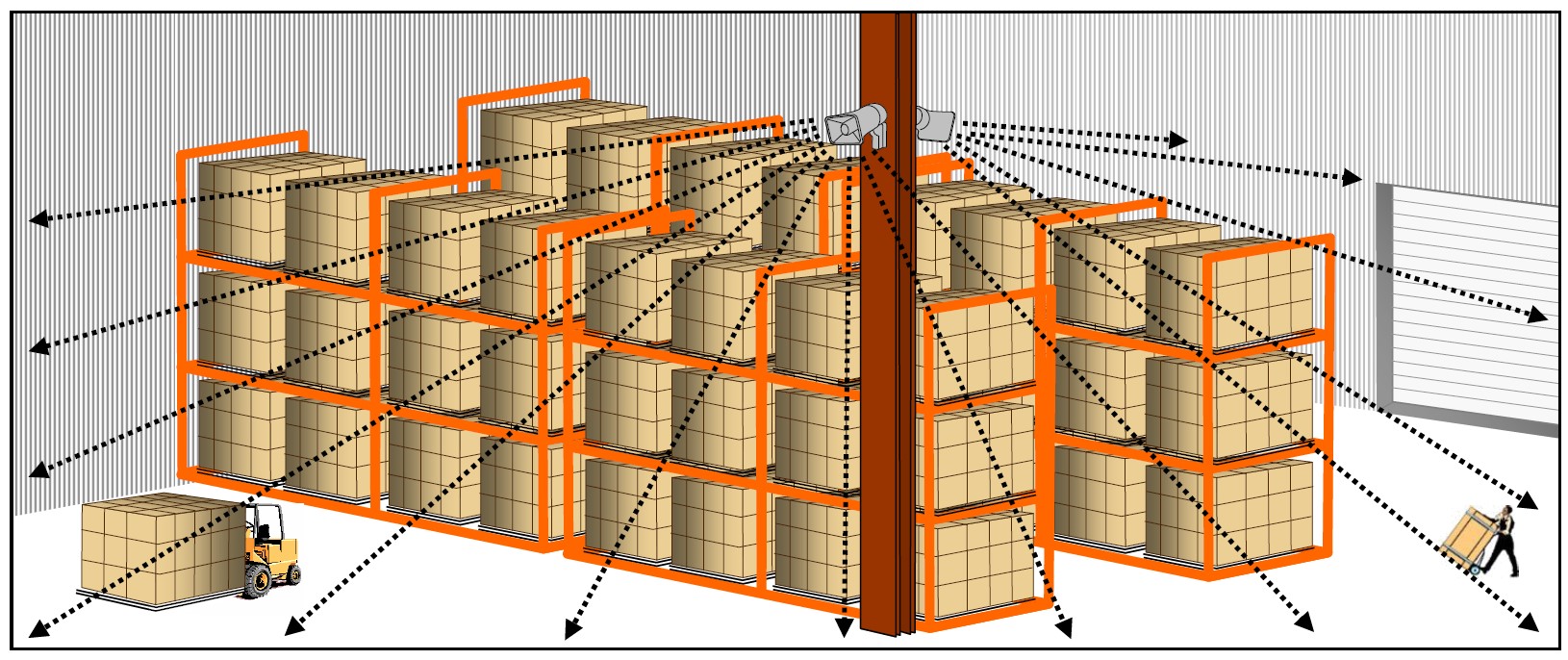
The routed audio is delivered to industrial-grade speakers — ceiling-mounted high-output units, surface-mounted horn speakers, or column speakers on structural supports — positioned to achieve adequate sound pressure levels above the ambient noise floor of the warehouse.
For IP-based warehouse paging systems, this entire process can be automated. A fire alarm activation triggers an immediate evacuation page. A shift change schedule broadcasts automatically at the programmed time. A security camera detecting an unauthorized access event can trigger a security alert broadcast to the relevant zone — all without manual intervention.
Types of Paging Systems Used in Warehouses
IP Paging Systems with Industrial Speakers
The recommended approach for most modern Texas warehouses. IP paging runs over the existing network, supports zone-by-zone control, integrates with access control and fire alarms, and uses high-output IP-enabled ceiling speakers or horn units designed for industrial environments. Scalable as the facility grows.
Analog Overhead Systems with Industrial Horns
Traditional analog amplifiers connected to hardwired industrial horn speakers or high-output ceiling units. Reliable and straightforward, but limited in zone control flexibility and scalability. A practical option for smaller warehouses with simple communication needs and established analog infrastructure.
Zone-Controlled Multi-Amplifier Systems
Large warehouses — particularly those exceeding 100,000 square feet — often require multiple amplifier zones to maintain consistent audio coverage across the full floor plan. Each zone has its own amplifier or IP zone controller, allowing different areas to receive different messages simultaneously.
Wireless Industrial Paging
For warehouses where running cable to all speaker locations is impractical — due to racking systems, open structural steel, or existing conduit limitations — wireless industrial speakers mounted on columns, structural steel, or pole stands provide coverage in hard-to-wire areas.
Integrated Safety Paging Systems
Advanced warehouse deployments integrate the paging system with fire alarms, emergency strobe lights, access control systems, and safety management platforms. When a fire alarm or emergency event triggers, the paging system automatically broadcasts the appropriate evacuation or safety message — independent of any manual operator action.
Key Benefits for Warehouse Operations
Instant Floor-Wide Communication A page reaches every worker on the floor in seconds — without requiring them to have a radio, respond to a phone call, or stop what they're doing to check a device. This is the most direct and reliable way to communicate in a large warehouse environment.
Improved Shift and Team Coordination Shift change announcements, team redeployment, break time coordination, and task updates are all managed more efficiently through a paging system — reducing the management overhead of coordinating large, distributed warehouse teams.
Faster Emergency Response OSHA emergency action plan requirements mandate that all employees receive emergency alerts immediately. A properly designed paging system ensures that every worker on every part of the floor hears a safety alert the moment it's triggered — with no gaps in coverage.
Zone-Specific Targeting Reduces Disruption A zone-controlled paging system allows supervisors to address specific teams or areas without broadcasting facility-wide. Paging the shipping team doesn't disrupt the receiving dock, and vice versa. This targeted communication reduces noise distraction and keeps messages relevant.
Integration with Warehouse Security Systems When integrated with Nexlar's warehouse security systems, access control, and security cameras, a paging system becomes part of a comprehensive safety and security infrastructure — enabling automated responses to security events and safety incidents.
Supports Productivity Monitoring and Accountability IP paging systems with event logging create a record of every page — who initiated it, when, and to which zone. This data supports operational review and accountability in environments where communication efficiency directly affects throughput.
Challenges: Noise, Size, and Coverage
Warehouse paging presents three major engineering challenges that don't apply to office or retail installations:
High Ambient Noise Levels Warehouses regularly operate at ambient noise levels between 75 and 95 decibels — generated by forklifts, conveyor systems, HVAC units, loading dock activity, and machinery. Standard commercial ceiling speakers rated at 90–95 dB SPL are simply not loud enough to achieve intelligible audio above this noise floor. Industrial speakers and horn units rated at 100–115 dB SPL are required to achieve adequate speech intelligibility in these environments.
Paging systems in high-noise environments must be designed to achieve a signal-to-noise ratio (SNR) of at least 10–15 dB above the ambient noise level — which means carefully engineering speaker selection, placement, and amplifier power to achieve those levels throughout the coverage area.
Large Open Spaces and High Ceilings Warehouse ceilings typically range from 20 to 50 feet in height. As speaker height increases, the distance the sound must travel to reach the listener increases — which means sound pressure levels at ear height are lower than the rated speaker output. High-ceiling installations require speakers with higher output ratings and carefully engineered placement plans to maintain coverage at floor level.
Open warehouse floor plans also present acoustic challenges. Without walls and ceilings to reflect sound, audio dissipates more quickly than in enclosed office environments. Speaker spacing must account for this dissipation to maintain consistent coverage across the floor.
Zone Coverage Across Large Floor Plans A single amplifier and speaker group cannot reliably cover a 200,000 sq. ft. warehouse floor with consistent audio quality. Multiple zone amplifiers, carefully positioned speaker clusters, and properly balanced audio levels are required to achieve even, intelligible coverage across large floor plans.
Best Practices for Warehouse Paging System Design
Conduct an Acoustic Site Survey Before Installation Never install warehouse paging without a professional acoustic assessment. Measure ambient noise levels across different areas of the facility, map the floor plan with ceiling heights and structural obstacles, and design speaker placement based on actual coverage calculations — not assumptions.
Use Industrial-Grade Speakers Rated for the Environment Select speakers specifically rated for industrial environments — with output levels appropriate for the measured ambient noise floor, appropriate IP dust and moisture ratings, and temperature tolerances suitable for Texas climate conditions including both heated and non-conditioned warehouse environments.
Design for Zones That Match Operational Reality Map your zones to how your warehouse actually operates. Shipping, receiving, pick/pack, mezzanine, loading docks, and break areas often benefit from independent zones so that messages can be targeted to the relevant team without disrupting the entire floor.
Position Speakers for Even Coverage, Not Just Ceiling Coverage In high-ceiling warehouses, downward-firing ceiling speakers lose significant SPL by the time audio reaches the floor. Consider using column speakers on structural supports at lower heights, or angled horn speakers positioned to project audio across the floor plane rather than straight down.
Ensure Your System Meets OSHA Emergency Alert Requirements Your paging system must be capable of alerting all employees to emergency situations — including workers in high-noise areas wearing hearing protection. This may require visual strobe alerts combined with audio paging in areas where hearing protection use is mandatory.
Integrate with Your Safety and Security Infrastructure A warehouse paging system that stands alone is less valuable than one that integrates with your fire alarm, access control, and security camera platforms. Automated emergency triggers and coordinated response protocols are far more effective than systems that require manual intervention during an incident.
Plan for Maintenance Access Warehouse environments are hard on equipment. Dust, vibration, temperature extremes, and physical activity accelerate wear on speakers and cabling. Design the system with maintenance access in mind and implement a regular inspection and health-check schedule.
How to Choose the Right System for Your Warehouse
Start with an Acoustic Assessment Measure your actual ambient noise levels across different areas and times of day. This data drives every equipment and placement decision in your system design.
Define Your Zone Requirements Identify the operational areas that need independent communication zones. At minimum, separate zones for high-noise production areas and quieter office or break room areas are recommended.
Choose IP Over Analog for Future Scalability IP paging systems are the recommended choice for most warehouse installations. They scale without rewiring, integrate with security systems, support remote management, and provide automated emergency broadcast capability that analog systems cannot deliver.
Verify Industrial Speaker Ratings Confirm that your selected speakers are rated for the specific conditions in your facility — output levels, IP dust/moisture rating, operating temperature range, and physical durability for warehouse environments.
Consider Integration Requirements If your warehouse uses Nexlar's access control systems or security camera platforms, choose a paging system designed to integrate with those platforms for a unified security and communication infrastructure.
Warehouse Paging System Comparison Table
| Feature | Analog + Industrial Horns | IP + Industrial Speakers | Wireless Industrial |
|---|---|---|---|
| Best For | Smaller warehouses | Mid-to-large warehouses | Hard-to-wire areas |
| High-Noise Coverage | Good (with proper horns) | Excellent | Good |
| Zone Control | Limited | Advanced | Moderate |
| Scalability | Low | High | Medium |
| Remote Management | No | Yes | Yes |
| Security Integration | No | Yes | Partial |
| Installation Complexity | Low–Medium | Medium | Low |
| Long-Term ROI | Moderate | High | Moderate |
Cost and Pricing for Warehouse Installations
| Warehouse Size | Recommended System | Estimated Cost Range |
|---|---|---|
| Small (under 20,000 sq. ft.) | Analog or Entry IP | $3,000 – $10,000 |
| Mid-Size (20,000 – 75,000 sq. ft.) | Mid-Range IP | $10,000 – $30,000 |
| Large (75,000 – 200,000 sq. ft.) | Enterprise IP with Multi-Zone | $25,000 – $60,000 |
| Very Large (200,000+ sq. ft.) | Custom Multi-Zone IP | $50,000 – $100,000+ |
These estimates include industrial-grade speakers, IP controllers or amplifiers, cabling, installation labor, zone configuration, and integration with existing security systems where applicable. Nexlar provides detailed, itemized quotes after every free on-site survey.
💡 Design a Paging System Built for Your Warehouse Floor
Nexlar's licensed team conducts a full acoustic and operational assessment of your warehouse — ensuring coverage is engineered for your actual noise levels and facility layout. 👉 Schedule Your Free On-Site Survey Today
Frequently Asked Questions
Q: What type of paging system works best in a warehouse?
A: An IP-based paging system with industrial-grade, high-output speakers or horn units is the recommended solution for most Texas warehouses. IP systems offer zone-based control, scalability, and integration with safety and security platforms. Industrial speakers rated at 100–115 dB SPL are required to achieve intelligible audio above the high ambient noise levels typical in warehouse environments. Speaker placement must be engineered through an acoustic site survey — not estimated.
Q: How do I ensure paging audio is audible above warehouse noise?
A: Achieving intelligible audio in a warehouse requires three things: industrial-rated speakers with sufficient SPL output to exceed the ambient noise floor by at least 10–15 decibels, correct speaker positioning and spacing based on measured coverage calculations, and appropriate amplifier power to drive the speaker system at the required levels. A professional acoustic site survey before installation is essential. Standard commercial ceiling speakers are insufficient for high-ambient-noise warehouse environments.
Q: How many zones does a warehouse paging system need?
A: The number of zones depends on the warehouse's layout and operational structure. As a minimum, separate zones are recommended for high-noise production or pick areas, loading dock areas, receiving areas, office and break rooms, and any mezzanine levels. Large warehouses may benefit from individual zones per aisle section or department. The goal is to be able to address specific teams or areas without broadcasting to the entire floor unnecessarily.
Q: Does OSHA require a paging or alarm system in a warehouse?
A: Yes. OSHA Standard 1910.165 requires that employers with more than ten employees have an employee alarm system capable of alerting all workers to emergency situations. The alarm system must be heard or seen above the ambient noise and light levels of the workplace. In warehouses where workers wear hearing protection, visual alert devices such as strobes may be required in addition to audio paging to satisfy OSHA requirements.
Q: Can a warehouse paging system integrate with fire alarms and access control?
A: Yes. IP-based warehouse paging systems can be integrated with fire alarm systems to trigger automatic evacuation announcements when an alarm activates, and with access control platforms to broadcast security alerts when unauthorized access events are detected. Nexlar designs integrated warehouse security and communication systems that combine paging, access control, and security cameras into a unified, automated safety infrastructure.
Q: What speaker type is best for a high-ceiling warehouse?
A: In high-ceiling warehouses (20 feet and above), downward-firing ceiling speakers often lose too much SPL by the time audio reaches floor level. Industrial horn speakers, column speakers mounted on structural steel at lower heights, or high-directivity speakers angled to project audio across the floor plane are more effective in high-ceiling environments. The specific recommendation depends on ceiling height, floor plan dimensions, and measured ambient noise levels — all assessed during a professional acoustic site survey.
Conclusion: Warehouse Paging Done Right Transforms Operations
A properly designed paging system does more than broadcast announcements in a warehouse — it reduces operational friction, accelerates emergency response, supports OSHA compliance, and gives supervisors the ability to coordinate large, distributed teams efficiently across a space that no other communication tool can reach as effectively.
Getting it right requires more than standard commercial paging knowledge. It requires industrial acoustic engineering expertise, experience with high-noise environments, and a thorough understanding of how warehouses actually operate. That's what Nexlar Security brings to every warehouse paging project across Texas.
Our licensed team (License# B14634) has designed and installed warehouse communication systems for distribution centers, logistics facilities, manufacturing plants, and industrial operations across Houston, Dallas, San Antonio, Austin, Fort Worth, and San Marcos.
Book your FREE on-site consultation today and let Nexlar design a warehouse paging system that truly covers every corner of your facility.
References
- OSHA 1910.165 – Employee Alarm Systems Standard
- OSHA 1910.95 – Occupational Noise Exposure Standard
- NFPA 72 – National Fire Alarm and Signaling Code (2022 Edition)
- ANSI/ASA S12.60 – Acoustical Performance Criteria for Speech Intelligibility
- Texas Department of Licensing and Regulation (TDLR) – Low Voltage Contractor Licensing
- Nexlar Security – Warehouse and Distribution Center Security: nexlar.com/warehouse-security-system
- Nexlar Security – Business Security Systems: nexlar.com/commercial-business-security-systems-installer
Follow Us