

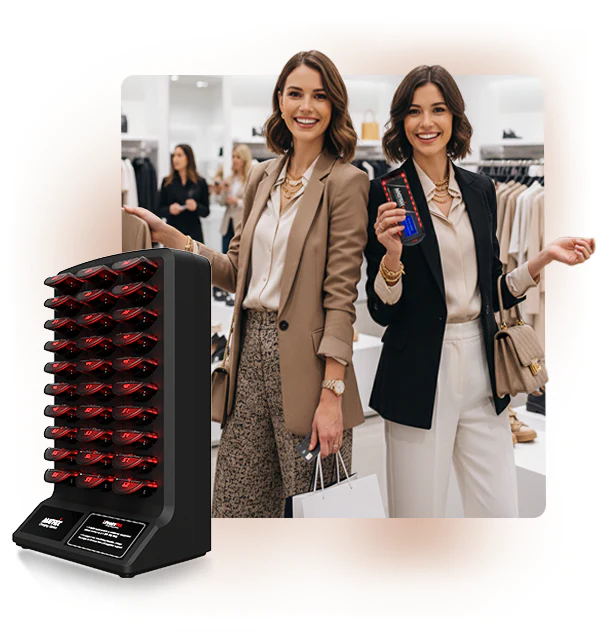
Paging System for Retail Stores & Big-Box Locations
Table of Contents
- Why Retail Stores Need a Paging System
- How a Retail Paging System Works
- Types of Paging Systems for Retail Environments
- Key Benefits for Retail Operations and Customer Experience
- Drawbacks and Limitations to Consider
- Retail-Specific Use Cases and Communication Scenarios
- How to Choose the Right Paging System for Your Store
- Retail Paging System Comparison Table
- Cost and Pricing for Retail Installations
- Frequently Asked Questions
- Conclusion
- References
Introduction
Whether you manage a neighborhood hardware store in Houston or a 150,000 square foot big-box retail location in Dallas, one thing is true across all of retail: staff communication speed and clarity directly affect how efficiently the store runs and how satisfied customers feel when they leave.
A well-designed retail paging system handles customer service calls at the touch of a button, coordinates staff across multiple departments without creating store-wide disruption, plays professional background messaging in customer-facing areas, and delivers emergency alerts instantly to every corner of the building.
Yet many Texas retail operators are still running outdated systems — crackling overhead speakers, inadequate coverage in back-of-house areas, no zone control, no integration with modern store systems. In a competitive retail environment, the quality of your internal communication is not a minor detail.
This guide from Nexlar Security walks retail operators through exactly what a modern retail paging system looks like — from a corner store to a big-box location — so you can make the right investment for your operation in 2026.
📞 Get a Free Assessment for Your Retail Location
Nexlar Security offers FREE on-site consultations for Texas retail businesses. Our licensed team designs paging systems that fit your store layout and operational workflow. 👉 Book Your Free Site Survey Today
Why Retail Stores Need a Paging System
Retail environments present a specific set of communication challenges that no other tool addresses as efficiently as a well-designed paging system. Customers are spread across large floor areas. Staff are constantly moving between departments, stockrooms, and customer service areas. Management needs to coordinate multiple teams simultaneously — and do it without disrupting the shopping experience.
Without a reliable paging system, retail staff rely on radios, personal phones, or physically walking across the store to communicate — all of which are slower, less professional, and more disruptive than a direct page. A customer waiting for assistance at a locked display case shouldn't have to wait while someone searches the store for a key holder.
Beyond daily operations, retail locations are increasingly required to have reliable emergency communication for fire evacuations, security threats, and active incident protocols. A paging system that handles routine customer service calls and emergency broadcasts from the same platform is both operationally efficient and a compliance asset.
For multi-location Texas retail chains, an IP-based paging system managed through a unified platform provides consistent communication standards across all stores — with centralized oversight and the ability to push updates without visiting each location individually.
How a Retail Paging System Works
In a retail environment, a paging system works by routing audio from a central input source — typically a microphone at the customer service desk, a register station, or a manager's office — through a controller that amplifies and distributes the signal to overhead speakers positioned throughout the store.
For IP-based retail systems, this controller is a network-connected device managed through a browser-based interface. Authorized staff at any networked workstation or phone extension can initiate a page to the entire store or to a specific zone — the electronics department, the garden center, the stockroom — without leaving their position.
Modern retail IP paging systems also support background music or scheduled messaging playback in customer-facing areas, which can be managed from the same platform as the staff communication and emergency paging functions. This eliminates the need for a separate background music system and simplifies store audio management.
Automated scheduling allows daily opening and closing announcements, scheduled promotional messages, and closing time warnings to play automatically at programmed times — without any staff action required. Emergency alerts can be triggered from a central office microphone, a register station, or a dedicated panic button at the customer service desk.
Types of Paging Systems for Retail Environments
Basic Analog Overhead System
The most traditional retail paging configuration. A central amplifier connects via dedicated speaker wire to ceiling speakers throughout the store. Simple to operate, low cost, and reliable for single-zone deployments. Appropriate for small retail stores with straightforward communication needs and limited budgets. No zone control, no remote management, and no integration with modern retail platforms.
IP Paging System with Zone Control
The recommended system for medium to large retail stores and big-box locations. IP paging runs over the existing network, supports multiple independent zones — sales floor, stockroom, receiving dock, customer service area, break room — and can be managed from any authorized device on the network. Background music playback, scheduled announcements, and emergency alerts are all managed from a single platform.
VoIP/SIP Integrated Paging
For retail stores running a VoIP phone system, SIP paging integrates overhead paging directly into the phone infrastructure — allowing staff to initiate pages from any register phone or workstation by dialing a designated extension. This eliminates the need for a separate paging amplifier and simplifies the overall store communication setup.
Multi-Site Managed Paging for Retail Chains
Cloud-managed IP paging platforms allow retail chains to manage paging systems across multiple Texas locations from a single administrative interface. Schedule updates, message changes, and system configuration can be applied across all stores simultaneously — ensuring consistent communication standards without site visits.
Wireless Paging for Outdoor Retail Areas
Retail locations with outdoor areas — garden centers, outdoor tool rental, curbside pickup zones, parking lot customer service — benefit from wireless outdoor speakers that extend paging coverage without the cost and disruption of running outdoor cabling.
Key Benefits for Retail Operations and Customer Experience
Faster Customer Service Response
A direct page to the relevant department — electronics, customer service, garden center — gets a staff member to a waiting customer faster than any other method. Reducing wait times directly improves customer satisfaction and increases conversion for high-touch purchase categories.
Professional Customer-Facing Audio
A properly designed retail paging system with ceiling speakers positioned for even coverage projects clear, professional audio throughout the store — enhancing the shopping experience rather than disrupting it. Poor audio quality, feedback, and uneven coverage create a negative customer impression.
Zone Control Reduces Unnecessary Disruption
Zone-specific paging means that a page to the stockroom team doesn't broadcast over the sales floor, and a customer service call in electronics doesn't play in the outdoor garden section. This targeted communication keeps the shopping environment quieter and more professional while still reaching the right staff.
Background Music and Scheduled Messaging Integration
IP retail paging platforms manage background music playback and scheduled promotional messages from the same controller as staff paging and emergency broadcasts — eliminating the need for multiple systems and simplifying store audio management.
Emergency Alert Capability
Fire evacuations, security threats, and active incident protocols require immediate, facility-wide communication. A retail paging system with emergency broadcast capability fulfills this requirement from the same platform used for daily operations — with no separate system to maintain.
Multi-Site Consistency for Retail Chains
Retail chains with multiple Texas locations benefit from IP paging systems that maintain consistent audio quality, announcement formats, and operational standards across all stores — managed centrally without site visits.
Drawbacks and Limitations to Consider
Background Noise in High-Traffic Areas
Active retail environments — particularly big-box stores with heavy foot traffic, HVAC systems, and product demonstration areas — can create ambient noise levels that reduce paging intelligibility. Proper speaker placement and volume calibration during installation is essential to ensure clear audio in high-traffic areas.
Aesthetics in High-End Retail
In upscale retail environments, visible ceiling speakers or exposed speaker cables can conflict with the store's design aesthetic. Surface-mount or recessed speakers designed for retail aesthetics are available but at higher cost per unit than standard commercial ceiling speakers.
Analog System Limitations for Growing Stores
Small retail stores that start with an analog system and later expand — adding departments, a second floor, or outdoor areas — quickly find that analog scalability limitations make expansion expensive and disruptive. Starting with an IP-capable system, even at slightly higher initial cost, avoids this issue entirely.
Staff Training for Zone-Based Systems
Staff need to know how to select the right zone for each type of page. Without proper training and clear zone labeling at paging stations, zone control systems get misused — pages go to the wrong areas, and the operational benefit of zone control is lost.
Retail-Specific Use Cases and Communication Scenarios
Customer Service Calls at Locked Displays
One of the most common retail paging use cases: a customer needs assistance at a locked display case — jewelry, electronics, firearms, or specialty items — and a staff member at the register pages the relevant department directly rather than leaving their post.
Price Check and Inventory Verification
Staff on the sales floor page the register or inventory management team for price verification, stock confirmation, or product location assistance — without leaving the customer or the display area.
Closing Time Announcements
Scheduled announcements — 30-minute warning, 15-minute warning, and store closing — play automatically at programmed times, eliminating the need for a staff member to manually broadcast closing notices each evening.
Loss Prevention Communication
In big-box retail environments, loss prevention staff use a secondary paging zone or coded announcement system to communicate with each other and with front-end staff about potential loss prevention situations — without alerting the subject of the observation.
Emergency Evacuation
Fire alarm integration or direct emergency broadcast capability allows store management to immediately activate an evacuation announcement facility-wide with a single trigger — meeting fire code requirements and ensuring all customers and staff receive the alert simultaneously.
Curbside Pickup and Parking Lot Notifications
Outdoor wireless paging speakers in curbside pickup zones or parking areas allow staff to notify customers that their order is ready — a customer experience enhancement that reduces wait times and phone call volume.
How to Choose the Right Paging System for Your Store
Assess Your Store Size and Layout
Small stores with a single open floor plan have fundamentally different requirements from a 100,000 sq. ft. big-box location with multiple departments, multiple floors, a stockroom, receiving docks, and outdoor areas. Start by mapping every area that needs paging coverage.
Determine How Many Zones You Need
Identify which areas of your store need to be addressed independently. At minimum, most retail stores benefit from separate zones for the sales floor, stockroom or receiving area, break room, and any outdoor coverage areas. Big-box locations may need 8–15 or more independent zones.
Analog or IP — Choose Based on Your Growth Plans
If your store is small, stable, and budget-constrained, an analog system may meet your current needs. If you plan to expand, if you want background music management from the same platform, or if you operate multiple locations, IP is the clearly superior long-term choice.
Background Music Requirements
If you want background music in customer-facing areas managed through the same system as your paging, choose an IP platform with integrated music management capabilities. This eliminates the cost and complexity of a separate background music system.
Multi-Site Management
If you operate more than one Texas retail location, a cloud-managed IP paging platform with centralized administration is a significant operational efficiency improvement over managing each store's system independently.
Retail Paging System Comparison Table
| Feature | Basic Analog | IP Zone Paging | VoIP/SIP Paging | Cloud Multi-Site |
|---|---|---|---|---|
| Zone Control | No | Yes | Yes | Yes |
| Background Music | No | Yes | Partial | Yes |
| Scheduled Announcements | No | Yes | Yes | Yes |
| Emergency Broadcast | Basic | Yes | Yes | Yes |
| Remote Management | No | Yes | Yes | Yes |
| Multi-Site Management | No | No | No | Yes |
| Scalability | Low | High | High | High |
| Upfront Cost | Low | Medium | Low – Medium | Medium – High |
| Best For | Small single stores | Mid–Large retail | VoIP-enabled stores | Retail chains |
Cost and Pricing for Retail Installations
| Store Size | System Type | Estimated Cost Range |
|---|---|---|
| Small Retail (under 5,000 sq. ft.) | Basic Analog | $1,500 – $4,000 |
| Mid-Size Store (5,000 – 20,000 sq. ft.) | Entry IP | $4,000 – $10,000 |
| Large Store (20,000 – 60,000 sq. ft.) | Mid-Range IP | $8,000 – $20,000 |
| Big-Box Location (60,000+ sq. ft.) | Enterprise IP Multi-Zone | $15,000 – $45,000 |
| Multi-Site Retail Chain | Cloud-Managed IP | Custom — contact Nexlar |
These estimates cover equipment, installation labor, zone configuration, and basic system training. Outdoor coverage, background music integration, and multi-site cloud management may affect the final project cost. Nexlar provides itemized quotes after every free on-site assessment.
💡 Get a Paging System That Fits Your Store and Your Budget
Nexlar designs retail paging solutions for stores of every size — from small neighborhood retailers to large format big-box locations — with honest pricing and no unnecessary features. 👉 Schedule Your Free On-Site Consultation Today
Frequently Asked Questions
Q: What is a retail paging system used for?
A: A retail paging system is used to broadcast voice announcements, customer service calls, staff coordination messages, and emergency alerts throughout a store via overhead ceiling speakers. Common uses include paging staff to assist customers at locked displays, announcing price checks, broadcasting closing time warnings, coordinating loss prevention communication, and activating emergency evacuation protocols. Modern IP retail paging systems also manage background music and scheduled promotional announcements from the same platform.
Q: What type of paging system is best for a big-box retail store?
A: A multi-zone IP paging system is the best choice for big-box retail locations. These stores require independent zone control across departments, stockrooms, receiving docks, break rooms, and outdoor areas — capability that analog systems cannot deliver effectively at big-box scale. IP systems also support background music management, scheduled announcements, emergency broadcast automation, and centralized management for multi-location retail chains, all from a single platform.
Q: Can a retail paging system also play background music?
A: Yes, with the right system. IP-based retail paging systems with integrated audio source management can play background music or promotional audio content in customer-facing zones while maintaining the ability to interrupt with live pages or emergency broadcasts. This eliminates the need for a separate background music system and simplifies store audio management. Not all IP paging systems include this capability — confirm with your installer before specifying.
Q: How many zones does a retail paging system need?
A: Zone requirements depend on the store's layout and operational communication needs. A small single-floor store may only need one or two zones. A large retail store typically benefits from separate zones for the main sales floor, stockroom, receiving dock, break room, and any outdoor areas. A big-box location may need 8 to 15 zones or more to address individual departments independently. Nexlar maps zone requirements during the free on-site assessment.
Q: Can a retail paging system integrate with a fire alarm? A: Yes. IP-based retail paging systems can integrate with fire alarm panels so that a fire alarm activation automatically broadcasts an evacuation announcement to all store zones simultaneously. This integration ensures that all customers and staff receive the evacuation alert immediately when the fire alarm sounds — without requiring a store manager to manually broadcast the message. Fire alarm integration is an important safety feature for retail stores of all sizes.
Q: Is a paging system suitable for a small retail store?
A: Yes. Small retail stores with a single open floor plan and basic communication needs are well served by a simple single-zone analog or entry-level IP system at a low cost. For stores with multiple departments, a stockroom separate from the sales floor, or plans to expand, an IP-based system provides better long-term value. Nexlar recommends the most cost-effective option for your specific store size and budget during the free consultation.
Q: Can I manage paging for multiple retail locations from one place?
A: Yes. Cloud-managed IP paging platforms allow retail chain operators to manage paging systems across multiple Texas locations from a single centralized dashboard — updating scheduled announcements, adjusting zone configurations, and monitoring system health across all stores simultaneously. Nexlar designs and installs multi-site IP paging solutions for Texas retail chains.
Conclusion: Retail Communication That Keeps Customers and Staff Connected
A reliable, well-designed paging system is one of the highest-value operational investments a retail store can make. It speeds up customer service response, reduces staff coordination friction, creates a professional store environment, and delivers emergency communication capability — all from a single platform that staff learn to use in minutes.
In 2026, Texas retail operators have access to IP paging technology that is more capable, more reliable, and more cost-effective than ever before. Whether you're running a single neighborhood store or managing a chain of big-box locations across the state, there's a paging solution sized and priced for your operation.
Nexlar Security designs and installs retail paging systems for stores of every size across Houston, Dallas, San Antonio, Austin, Fort Worth, and San Marcos. Our licensed team (License# B14634) handles everything from initial site assessment and system design to installation, configuration, and long-term support.
Book your FREE on-site consultation today and let Nexlar design the right paging system for your retail business.
References
- Texas Department of Licensing and Regulation (TDLR) — Low Voltage Contractor Licensing
- NFPA 72 — National Fire Alarm and Signaling Code (2022 Edition)
- OSHA 1910.165 — Employee Alarm Systems Standard
- National Retail Federation (NRF) — Store Operations Technology Standards
- Nexlar Security — Commercial Business Security Systems: nexlar.com/commercial-business-security-systems-installer
- Nexlar Security — Integrated Security Solutions: nexlar.com/integrated-security
Follow Us