

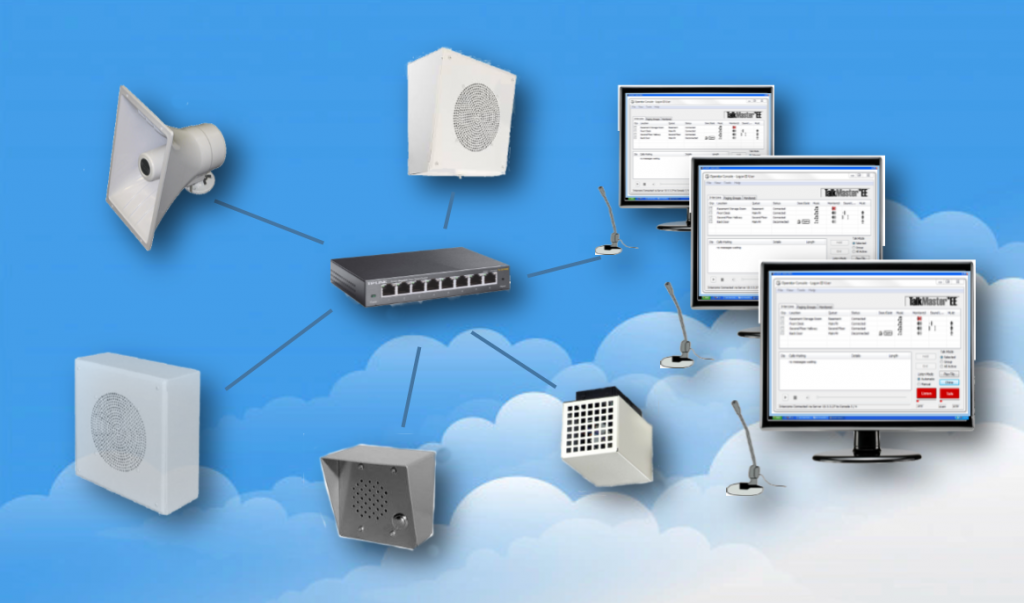
IP Paging Systems: The Complete 2026 Guide
Table of Contents
- What Is an IP Paging System?
- How Does an IP Paging System Work?
- Types of IP Paging Systems
- Key Benefits of IP Paging Systems
- Drawbacks & Limitations
- Common Use Cases & Industries
- How to Choose the Right IP Paging System
- IP Paging vs. Analog: Quick Comparison
- Cost & Pricing of IP Paging Systems
- Frequently Asked Questions
- Conclusion
- References
Introduction
Business communication has changed dramatically over the past decade. The old approach — dedicated speaker wiring, standalone amplifiers, and limited zone control — is quickly being replaced by something smarter, more flexible, and far more powerful.
IP paging systems represent the modern standard for commercial audio communication. They run over your existing network, integrate with your security infrastructure, and can be managed from anywhere in the world. For Texas businesses managing large facilities or multiple locations, the advantages are impossible to ignore.
Whether you're upgrading an outdated system or designing communication infrastructure from scratch, this complete guide gives you everything you need to make a confident decision. Nexlar Security brings its expertise to every word — so you're getting advice from a team that has installed these systems for over 1,000 businesses across Texas.
📞 Ready to Upgrade to IP Paging?
Nexlar Security offers a FREE on-site survey for Texas businesses. Our licensed experts will assess your current infrastructure and design an IP paging solution built for your facility. 👉 Book Your Free Consultation Today
What Is an IP Paging System?
An IP paging system is a network-based audio communication platform that transmits voice messages and announcements over an existing Internet Protocol (IP) infrastructure — your local area network (LAN) or Wi-Fi — instead of traditional dedicated speaker wiring.
The term "IP" refers to the same networking standard that powers your computers, phones, and cameras. Rather than running separate cables for your paging system, an IP paging solution uses the wiring and network switches you already have in place. Every speaker, controller, and input device on the system communicates as an addressable network endpoint.
This fundamental shift in how audio travels — from copper wire to digital network packet — unlocks capabilities that traditional analog systems simply cannot match: remote management, unlimited scalability, event-triggered automation, and seamless integration with access control systems, security cameras, and fire alarm platforms.
In 2026, IP paging has become the preferred choice for any Texas business that wants a communication system capable of growing with its needs.
How Does an IP Paging System Work?
Understanding the architecture of an IP paging system helps you make better decisions during the design phase. Here's a clear breakdown of how the system functions end to end:
The Core Components
- IP Audio Controller / Server — The brain of the system. This manages zones, users, schedules, and audio routing. It can be a dedicated hardware appliance or a software platform running on a server.
- IP Audio Endpoints — Network-connected speakers, ceiling units, desktop speakers, or multi-function devices that receive audio streams and play them at configured volume levels. Each endpoint has its own IP address.
- Input Sources — Microphones, SIP phone extensions, software dashboards, API integrations, or automated system triggers (alarms, schedules, access control events).
- Network Infrastructure — Your existing LAN switches, routers, and cabling (typically Cat5e or Cat6) carry all audio data. Power over Ethernet (PoE) switches can power IP speakers directly through the network cable, eliminating the need for separate power runs.
The Signal Flow
- An operator activates a page using a microphone, software client, or SIP phone extension.
- The IP controller receives the request, authenticates the user, and determines the target zone(s) based on the configuration.
- The audio is encoded into a digital stream (typically using SIP/RTP protocols) and transmitted across the network.
- Target IP audio endpoints receive the stream, decode it, and play the announcement through their built-in amplifiers and speakers.
- In advanced systems, the controller logs the event, timestamps it, and can send confirmation notifications to administrators.
The entire process from button press to audio output happens in milliseconds — giving IP paging the same real-time delivery speed as traditional wired systems, with dramatically more intelligence behind it.
Types of IP Paging Systems
IP paging systems aren't one-size-fits-all. Here are the main configurations deployed in commercial Texas facilities:
SIP-Based IP Paging Systems
These systems use the Session Initiation Protocol (SIP) — the same standard used by modern VoIP phone systems. SIP-based paging integrates directly with your existing VoIP or unified communications platform, allowing staff to initiate a page from any phone extension. Ideal for offices and facilities with existing VoIP infrastructure.
Standalone IP Paging Systems
Purpose-built paging platforms that operate independently of a phone system. These use dedicated paging controllers and software, offering more granular control, advanced scheduling, and deeper integration with security systems. Best for enterprise facilities with complex multi-zone needs.
Cloud-Managed IP Paging Systems
The latest evolution in paging technology. Cloud-managed systems store configuration, user management, and event logs in the cloud — allowing full remote management from any internet-connected device. These are particularly valuable for multi-site Texas businesses managing facilities across Houston, Dallas, San Antonio, and beyond.
Hybrid IP/Analog Systems
Designed for facilities transitioning from legacy analog infrastructure to IP. A hybrid system bridges existing analog speakers with an IP controller, protecting your existing hardware investment while gradually migrating to full IP. Nexlar frequently recommends this approach for businesses with established speaker infrastructure.
Key Benefits of IP Paging Systems
1. Leverages Your Existing Network Infrastructure Because IP paging runs over your LAN, there's no need to install separate dedicated speaker wiring throughout your facility. In most cases, your existing Cat5e or Cat6 cabling and network switches are all you need. PoE switches can even power the speakers through the same cable — simplifying installation significantly.
2. Fully Scalable Without Major Infrastructure Changes Need to add a new zone, floor, or building? Simply plug in a new IP audio endpoint, assign it an IP address, and add it to the appropriate zone in the software. No rewiring. No dedicated cable runs. Growth is limited only by your network — not your physical infrastructure.
3. Remote Management from Anywhere An IP paging controller can be accessed through a web browser or mobile app from any location. For Texas businesses managing multiple facilities, this is transformative — administrators can update schedules, change zone configurations, or broadcast emergency messages from a phone or laptop anywhere in the world.
4. Advanced Zone Control Segment your facility into as many zones as needed — by floor, department, building, or campus. Broadcast to individual zones, selected groups, or the entire facility simultaneously. Each zone can have independent volume settings, schedules, and access permissions.
5. Automated Scheduling Schedule recurring announcements — shift changes, break times, building closing notifications — to play automatically at set times. No manual intervention required. This reduces the burden on staff and ensures consistency across your operations.
6. Event-Triggered Automation IP paging systems can be programmed to trigger automatically based on external events. A fire alarm activation can instantly trigger an evacuation message. An access control door forced open alert can broadcast to security staff. A perimeter breach detected by a security camera can initiate a lockdown announcement.
7. High-Quality Audio Digital audio encoding delivers superior sound clarity compared to traditional analog systems — especially across long cable runs or in acoustically challenging environments. Every word is crisp and intelligible.
8. Integrates with Your Full Security Ecosystem This is perhaps the most powerful advantage of IP paging. When integrated with Nexlar's business security systems, access control, and camera platforms, your paging system becomes an active participant in your facility's safety and response protocols — not just a passive announcement tool.
Drawbacks & Limitations
To give you a complete picture, here are the genuine limitations of IP paging systems:
Network Dependency IP paging systems rely entirely on your network infrastructure. A network outage, switch failure, or bandwidth bottleneck can disrupt communication. This is why Nexlar always recommends building redundancy into your network design when paging is business-critical.
Higher Upfront Investment IP systems generally cost more than analog setups at the point of installation. However, the long-term ROI — driven by lower maintenance costs, scalability, and operational efficiency — typically outweighs the initial difference within two to three years.
IT Coordination Required Installing and maintaining an IP paging system requires coordination with your IT team, particularly around network segmentation, VLAN configuration, QoS settings, and PoE switch capacity. This isn't a barrier with an experienced installer, but it's a factor to plan for.
Staff Training The additional features of an IP system — zone management, schedule creation, remote access — require proper training for the staff who will use them regularly. Nexlar provides hands-on training and documentation as part of every installation project.
Common Use Cases & Industries
Multi-Site Texas Businesses IP paging is ideal for businesses with multiple Texas locations. A single administrator can manage paging systems across facilities in Houston, Dallas, and San Antonio from one cloud-based dashboard.
Healthcare Facilities Code alerts, overhead announcements, and emergency protocols in hospitals and medical campuses benefit enormously from IP paging's automation and zone control capabilities. Nexlar supports healthcare security solutions across Texas.
Schools & Campuses Bell schedules, emergency lockdowns, and daily announcements across multi-building educational campuses are seamlessly managed through IP multi-zone paging. Nexlar's educational security systems integrate paging with access control and camera systems.
Warehouses & Distribution Centers Real-time safety alerts, shift changes, and dock coordination across massive warehouse floors are made efficient and reliable with IP-based paging. Nexlar serves distribution centers throughout Texas.
Government Buildings Government facilities require secure, auditable, and highly reliable communication infrastructure. IP paging with event logging and remote management meets those standards.
Data Centers Data center facilities require precise, zone-specific communication with high reliability — exactly what enterprise IP paging delivers.
Retail Chains & Hospitality Multi-location retailers and hospitality groups benefit from centrally managed paging across all their Texas locations — consistent messaging, consistent tone, consistent brand experience.
How to Choose the Right IP Paging System
Assess Your Network Infrastructure Before selecting a system, evaluate your existing network. Confirm your cabling category (Cat5e minimum for PoE), your switch capacity, and whether your infrastructure can support additional PoE devices. Nexlar can assess this during the free on-site survey.
Determine Your Zone Requirements Map your facility and define your zones. How many independent audio areas do you need? Will zones ever need to receive different simultaneous messages? The answer shapes your system architecture.
Define Integration Requirements If you want your paging system to interact with access control events or fire alarm triggers, choose a platform with robust API and integration support. Not all IP paging systems are equally capable here.
Cloud vs. On-Premise Management Cloud-managed systems are the better choice for multi-site businesses and those who need remote management flexibility. On-premise systems offer complete local control without internet dependency — better for high-security or government facilities.
SIP Integration If your business uses a VoIP phone system, choose an IP paging system with native SIP support to initiate pages from any phone extension without additional hardware.
Vendor Support & Licensing Choose an installer with proven experience in IP paging — not just general cabling or security. Nexlar is a licensed Texas low-voltage contractor (License# B14634) with extensive experience designing and deploying IP communication systems for commercial clients.
IP Paging vs. Analog: Quick Comparison
| Feature | IP Paging | Analog Paging |
|---|---|---|
| Signal Transmission | Over LAN / Wi-Fi | Dedicated copper wiring |
| Scalability | Unlimited | Limited by wiring |
| Remote Management | Yes (web/app) | No |
| Security System Integration | Yes | No |
| Automated Scheduling | Yes | No |
| Event-Triggered Broadcasting | Yes | No |
| Audio Quality | Excellent | Good |
| Installation Cost | Medium – High | Low – Medium |
| Long-Term ROI | High | Moderate |
| PoE Power Support | Yes | No |
| Best For | Modern, scalable facilities | Small legacy installations |
Cost & Pricing of IP Paging Systems
Here's a general pricing guide for IP paging system installations in Texas:
| System Type | Estimated Range |
|---|---|
| Small IP Paging Setup (1–3 zones) | $3,000 – $8,000 |
| Mid-Size IP System (4–15 zones) | $8,000 – $25,000 |
| Enterprise IP System (15+ zones) | $25,000 – $75,000+ |
| Cloud-Managed Multi-Site System | $15,000 – $100,000+ |
Key cost factors:
- Number of IP audio endpoints and speaker count
- Number of zones and zone complexity
- PoE switch capacity upgrades
- Server or controller hardware
- Integration with security or fire alarm systems
- Software licensing (annual or one-time)
- Installation labor and configuration
Nexlar provides complete transparency on pricing. Every project begins with a free on-site survey, followed by a detailed, itemized quote — no surprises, no hidden fees.
💡 Get an Accurate IP Paging Quote for Your Texas Facility
Nexlar's free on-site survey covers everything — network readiness, zone mapping, integration requirements, and a clear cost breakdown. Zero obligation. 👉 Schedule Your Free On-Site Survey Now
Frequently Asked Questions
What is an IP paging system?
An IP paging system is a network-based audio communication platform that transmits voice announcements and alerts over an existing IP network infrastructure — your LAN or Wi-Fi — rather than traditional dedicated speaker wiring. It allows zone-based broadcasting, remote management, automated scheduling, and integration with security and fire alarm systems.
How is an IP paging system different from a traditional PA system?
A traditional PA system uses dedicated copper wiring and standalone amplifiers with limited scalability and no remote management. An IP paging system uses your existing network, supports unlimited zones, can be managed remotely from any device, and integrates with security platforms, VoIP systems, and automation tools.
Does an IP paging system require new wiring?
In most cases, no. IP paging systems use your existing network cabling (Cat5e or Cat6). IP speakers can be powered directly through PoE (Power over Ethernet) switches, eliminating the need for separate power runs. This makes IP paging significantly easier and less disruptive to install than traditional wired systems.
Can an IP paging system be triggered by a fire alarm?
Yes. IP paging systems can be integrated with fire alarm systems so that an alarm activation automatically triggers a pre-recorded evacuation announcement across all zones or targeted areas. This is a common requirement in commercial, healthcare, and educational facilities.
Can I manage my IP paging system remotely?
Yes. Cloud-managed IP paging systems can be fully configured and monitored from any internet-connected device — a laptop, tablet, or smartphone. Administrators can update schedules, broadcast live messages, and review event logs from anywhere in the world.
What network requirements does an IP paging system need?
At a minimum, you need a Cat5e or Cat6 LAN infrastructure, a managed network switch with sufficient PoE budget for speaker endpoints, and a stable network with low latency. For best performance, it is recommended to configure a dedicated VLAN for paging traffic and apply QoS settings to prioritize audio. Nexlar's team handles all network configuration as part of the installation.
Is an IP paging system right for a small business?
It depends on your facility size and growth plans. For small businesses with two to four zones and no plans to expand, a basic analog system may be more cost-effective. For businesses planning to grow — or those that want integration with security systems — an IP paging system is almost always the better long-term investment.
How long does an IP paging system installation take?
A small to mid-size IP paging installation typically takes two to four days. Large, multi-zone enterprise systems can take one to two weeks. Nexlar provides a detailed project schedule during the consultation phase.
Conclusion: IP Paging Is the Smart Choice for Texas Businesses in 2026
If your business is still relying on an outdated analog system — or you're designing communication infrastructure for a new facility — an IP paging system is the clear choice for 2026 and beyond. The combination of network-based flexibility, unlimited scalability, remote management, and deep security integration makes it the most powerful commercial communication solution on the market.
The upfront investment is higher than analog, but the long-term ROI — in reduced maintenance costs, operational efficiency, and future-proof scalability — makes it the smarter financial decision for any growing Texas business.
Nexlar Security has designed and installed IP paging systems for businesses of every size across Houston, Dallas, San Antonio, Austin, Fort Worth, and San Marcos. Our licensed team handles everything from network readiness assessment and system design to full installation, integration, and staff training.
Take the next step today. Book your FREE on-site consultation with Nexlar and get a custom IP paging solution designed specifically for your facility.
References
- Texas Department of Licensing and Regulation (TDLR) – Low Voltage Contractor Licensing
- BICSI – Network Infrastructure and IP Communications Standards
- NFPA 72 – National Fire Alarm and Signaling Code (2022)
- Telecommunications Industry Association (TIA) – TIA-568 Structured Cabling Standards
- Session Initiation Protocol (SIP) – RFC 3261
- Nexlar Security – Business Security Systems: nexlar.com/commercial-business-security-systems-installer
- Nexlar Security – Integrated Security: nexlar.com/integrated-security
- Nexlar Security – Low Voltage Cabling: nexlar.com/cabling-company
Follow Us