

Analog vs IP Paging Systems: Cost, Features & ROI Compared
Table of Contents
- Analog vs IP Paging: What's the Difference?
- How Each System Works
- Types: Analog System Variants vs IP System Variants
- Key Benefits: Analog vs IP
- Drawbacks & Limitations of Each
- Common Use Cases: Which Industries Choose Which?
- How to Decide: Analog or IP for Your Business?
- Full Feature Comparison Table
- Cost & ROI Comparison
- Frequently Asked Questions
- Conclusion
- References
Introduction
It's one of the most common questions Nexlar Security receives from Texas businesses planning a communication system upgrade: Should I go with analog or IP paging?
It's a fair question — and the honest answer is that it depends entirely on your facility, your budget, your existing infrastructure, and where your business is headed over the next five years.
Both technologies work. Both have legitimate use cases. But they are fundamentally different in how they operate, what they can integrate with, how they scale, and what they'll cost you over the long haul.
In this guide, Nexlar's experts put analog and IP paging systems side by side in a detailed, no-nonsense comparison. By the time you finish reading, you'll know exactly which one is right for your Texas business in 2026.
📞 Not Sure Which System to Choose?
Nexlar Security offers FREE on-site assessments for Texas businesses. Our licensed team evaluates your facility, infrastructure, and goals — then recommends the right system with zero pressure. 👉 Book Your Free On-Site Survey Today
Analog vs IP Paging: What's the Difference?
At the highest level, the difference comes down to how audio travels from the source to the speaker.
Analog paging systems transmit audio as continuous electrical signals over dedicated copper wiring. Every speaker is hardwired to a central amplifier. The system is self-contained and operates independently of any network.
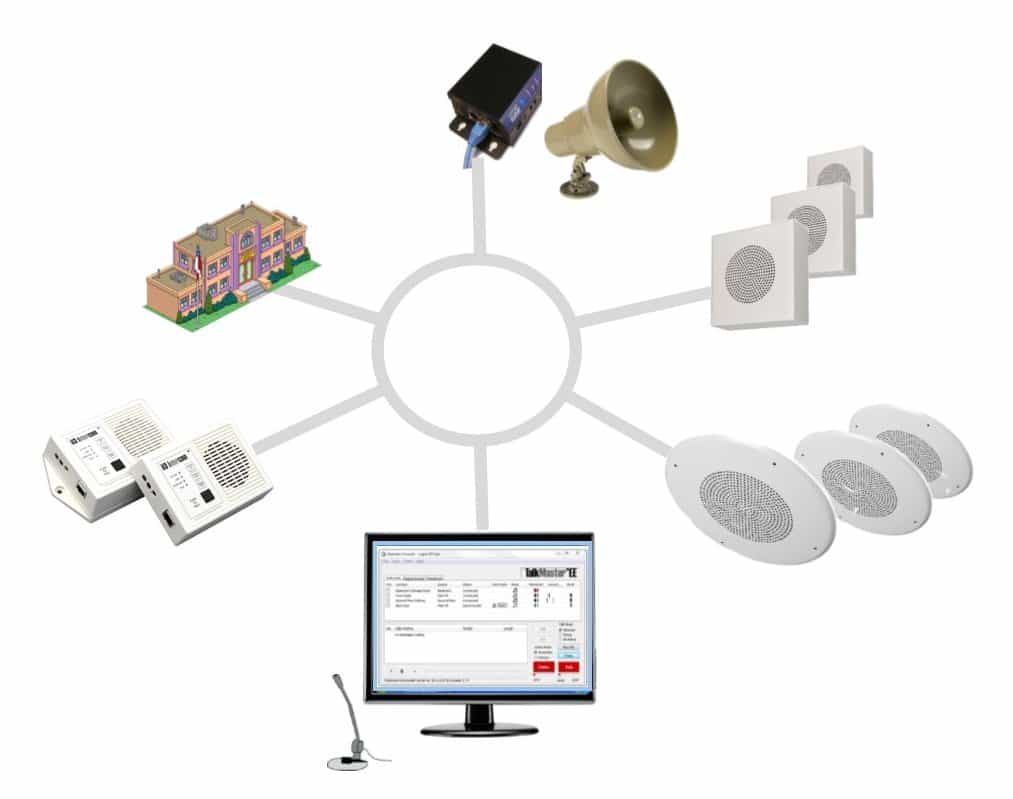
IP paging systems transmit audio as digital data packets over your existing IP network — the same infrastructure that runs your computers, phones, and security cameras. Speakers become network endpoints with IP addresses, managed through software from any device on the network.
This fundamental difference in signal transmission creates a cascade of differences in scalability, flexibility, integration capability, management, and long-term cost — which is exactly what this guide explores.
How Each System Works
How Analog Paging Works
An operator speaks into a microphone connected to a central amplifier. The amplifier boosts the audio signal and sends it simultaneously through dedicated copper speaker wires to all connected speakers — or to a specific wired zone, if the system is designed for zone control. Volume, tone, and basic zone routing are managed through physical controls on the amplifier unit.
There is no software interface, no network connectivity, and no remote management. Everything is hardwired and operates locally.
How IP Paging Works
An operator initiates a page through a microphone, software dashboard, or SIP phone extension. The IP controller receives the request, identifies the target zones, encodes the audio as a digital stream, and transmits it over the local area network to the designated IP audio endpoints. Each endpoint decodes the stream and plays the audio through its built-in speaker.
The system is managed through a web interface or mobile app, supports automated scheduling, logs every event, and can be integrated with access control, security cameras, and fire alarm systems — all without dedicated speaker wiring.
Types: Analog System Variants vs IP System Variants
Analog System Variants
Basic Single-Zone Analog One amplifier, one set of wired speakers, one broadcast area. Simple and cost-effective for small single-floor offices or retail stores.
Multi-Zone Analog Multiple amplifier channels or zone controllers, each wired to a separate speaker group. Allows some level of targeted broadcasting but requires dedicated wiring per zone — increasing installation cost and complexity.
Analog with Telephone Paging Interface Integrates with a legacy telephone system to allow pages to be initiated from a phone extension — a common setup in older commercial buildings.
IP System Variants
SIP-Based IP Paging Integrates with VoIP phone systems using SIP protocol. Allows pages to be initiated from any phone extension across the facility. Ideal for offices already running VoIP infrastructure.
Standalone IP Paging Purpose-built paging controllers and software that operate independently of a phone system. Offers deep zone control, scheduling, and security integration.
Cloud-Managed IP Paging Fully remote management via cloud platform. Ideal for multi-site Texas businesses managing facilities in Houston, Dallas, San Antonio, and beyond.
Hybrid Analog/IP A bridge system that connects existing analog speakers to an IP controller — protecting your hardware investment while gaining IP management capabilities. Nexlar frequently recommends this as a cost-effective first step for facilities with existing analog speaker infrastructure.
Key Benefits: Analog vs IP
Benefits of Analog Paging Systems
Lower Initial Cost Analog systems have a lower entry price. For small facilities with basic communication needs, the cost of an analog setup is significantly less than an equivalent IP system.
No Network Dependency Because analog systems operate independently of your IT infrastructure, a network outage has zero impact on your paging capability. This is a genuine advantage in environments where network reliability is uncertain.
Simpler Operation Analog systems are straightforward to use. Staff training is minimal, and there are fewer components to manage.
Proven Reliability Analog technology has been in use for decades. The components are mature, well-understood, and supported by a broad service community.
Benefits of IP Paging Systems
Scalability Without Rewiring Adding new zones, floors, or buildings requires only a new IP endpoint and a network port — no dedicated cable runs. This is the single biggest operational advantage of IP over analog for growing businesses.
Remote Management System administrators can update configurations, schedule broadcasts, and even push live announcements from any device, anywhere. For businesses with multiple Texas locations, this capability alone justifies the investment.
Deep Security Integration IP paging integrates directly with access control systems, security cameras, fire alarms, and building automation platforms. This creates a truly connected, responsive facility. Analog systems simply cannot match this.
Automated Scheduling & Event Triggers Schedule recurring announcements or configure the system to broadcast automatically when triggered by an external event — an alarm activation, a door forced open, or a scheduled shift change. This level of automation is not possible with analog.
Superior Audio Quality Digital encoding delivers cleaner, clearer audio than analog transmission — especially noticeable across large facilities or long cable runs where analog signal can degrade.
Detailed Event Logging Every page, every user, every zone — IP systems log it all with timestamps. This creates an audit trail that is valuable for compliance, incident investigation, and operational review.
Drawbacks & Limitations of Each
Analog System Limitations
- Scaling is painful. Every new zone requires new dedicated wiring — labor-intensive and expensive.
- No remote management. If you need to change a setting or update a zone configuration, someone has to physically access the amplifier.
- No integration with modern platforms. Analog systems cannot connect to IP-based access control, security cameras, or fire alarm systems in any meaningful way.
- Aging technology. The industry is moving firmly toward IP. Replacement parts for analog systems are becoming harder to source, and fewer technicians specialize in legacy analog installations.
- Limited zone control. Even multi-zone analog systems offer far less flexibility than IP systems in how zones are configured and targeted.
IP System Limitations
- Higher upfront cost. IP systems require a larger initial investment — particularly if your network infrastructure needs upgrading to support PoE and additional managed switch capacity.
- Network dependency. A network failure affects your paging system. Proper redundancy design is essential for business-critical deployments.
- IT coordination required. Setting up VLANs, QoS settings, and PoE configurations requires input from your IT team or a skilled integrator like Nexlar.
- More complex to operate fully. Taking full advantage of scheduling, event triggers, and zone management requires proper training and ongoing system management.
Common Use Cases: Which Industries Choose Which?
Industries That Typically Choose Analog
- Small retail stores with simple, single-zone announcement needs
- Small offices with fewer than 20 employees and no integration requirements
- Facilities with existing analog infrastructure where a full IP replacement isn't yet justified
- Budget-constrained projects where a basic, reliable system is the priority
Industries That Typically Choose IP
Healthcare — Hospitals and clinics demand automated code alerts, zone-specific communication, and integration with nurse call and fire alarm systems. IP is non-negotiable. Nexlar's healthcare security solutions integrate paging with the full security ecosystem.
Education — Multi-building school campuses need centralized management across dozens of zones. IP paging with lockdown automation is the modern standard. Nexlar serves educational facilities across Texas.
Warehouses & Distribution — Large floor spaces, multiple departments, and safety-critical communication requirements point squarely at IP. Nexlar's warehouse security systems frequently include integrated IP paging.
Government Facilities — Compliance requirements, audit logging, and emergency protocol automation favor IP systems for government buildings.
Multi-Site Businesses — Any business managing facilities across Houston, Dallas, San Antonio, Austin, Fort Worth, or San Marcos benefits enormously from centralized IP paging management.
Data Centers — Precise zone communication and system reliability are paramount in data center environments.
How to Decide: Analog or IP for Your Business?
Here is a direct, practical decision framework:
Choose Analog If:
- Your facility is small (under 5,000 sq. ft.) with one or two zones
- You have a tight budget and don't need integration or remote management
- You already have analog infrastructure and don't plan to expand
- Network reliability at your facility is uncertain or poor
Choose IP If:
- Your facility is mid-size to large or spans multiple buildings
- You plan to grow and need a system that scales without rewiring
- You want integration with access control, security cameras, or fire alarms
- You manage multiple Texas locations and need centralized remote management
- You need automated scheduling or event-triggered announcements
- You want detailed event logging for compliance or audit purposes
Choose a Hybrid System If:
- You have existing analog speakers in good condition and want to protect that investment
- You want IP management capabilities without replacing all your hardware
- You're planning a phased migration toward full IP over time
If you're still unsure, Nexlar's free on-site survey will give you a clear, objective recommendation based on your specific facility and goals — not a one-size-fits-all answer.
Full Feature Comparison Table
| Feature | Analog Paging | IP Paging |
|---|---|---|
| Signal Transmission | Copper wiring | IP network (LAN/Wi-Fi) |
| Installation Complexity | Moderate | Low (uses existing LAN) |
| Scalability | Low | High |
| Remote Management | No | Yes (web/mobile app) |
| Zone Control | Limited | Advanced |
| Audio Quality | Good | Excellent |
| Security System Integration | No | Yes |
| VoIP / Phone Integration | Limited | Full SIP support |
| Automated Scheduling | No | Yes |
| Event-Triggered Broadcasts | No | Yes |
| Event Logging / Audit Trail | No | Yes |
| PoE Power Support | No | Yes |
| Network Dependency | None | High |
| Upfront Cost | Low – Medium | Medium – High |
| Long-Term ROI | Moderate | High |
| Technology Longevity | Declining | Growing |
| Best For | Small, simple facilities | Enterprise / Multi-Site |
Cost & ROI Comparison
Upfront Installation Costs
| System Type | Estimated Range |
|---|---|
| Basic Analog (Single Zone) | $1,500 – $4,000 |
| Multi-Zone Analog | $4,000 – $12,000 |
| Basic IP Paging (2–4 zones) | $4,000 – $10,000 |
| Mid-Size IP System (5–15 zones) | $10,000 – $30,000 |
| Enterprise IP System | $30,000 – $75,000+ |
| Hybrid Analog/IP Migration | $5,000 – $20,000 |
Long-Term ROI Comparison
Analog ROI Considerations
- Lower initial cost, but limited scalability means additional wiring costs every time you expand
- No productivity gains from automation or remote management
- Rising maintenance costs as components age and parts become harder to source
- No contribution to a unified security and communication ecosystem
IP ROI Considerations
- Higher initial investment offset by scalability — expansion adds endpoints, not new infrastructure
- Operational savings through automated scheduling and reduced manual communication tasks
- Lower long-term maintenance costs with cloud-managed or remotely monitored systems
- Integration with security platforms reduces liability and improves incident response
- Audit logging supports compliance and reduces legal exposure
In most mid-to-large facilities, an IP paging system pays back its premium over an analog system within two to three years — and continues delivering operational value long after.
💡 Want a Side-by-Side Quote for Your Facility?
Nexlar can provide quotes for both analog and IP solutions so you can compare exactly what each option costs for your specific facility — no guesswork, no pressure. 👉 Schedule Your Free On-Site Survey Today
Frequently Asked Questions
What is the main difference between analog and IP paging systems?
The main difference is how audio is transmitted. Analog paging systems use dedicated copper wiring to carry audio signals from a central amplifier to speakers. IP paging systems transmit digital audio over an existing IP network. This difference determines scalability, integration capability, remote management options, and long-term cost.
Is an IP paging system more expensive than analog?
IP paging systems typically have a higher upfront cost than analog systems. However, they offer significantly better long-term ROI due to lower expansion costs, reduced maintenance, automation capabilities, and integration with security platforms. For most growing businesses, the total cost of ownership over five years favors IP.
Can I keep my existing speakers when switching from analog to IP?
In many cases, yes. A hybrid analog/IP system can connect existing analog speakers to an IP controller using interface adapters, protecting your hardware investment while adding IP management capabilities. Nexlar assesses your existing infrastructure during the free site survey to determine the most cost-effective migration path.
Which is better for emergency communication — analog or IP?
IP paging is significantly better for emergency communication. IP systems support automated event-triggered broadcasting, zone-specific alerts, integration with fire alarms and access control, and remote emergency announcements. Analog systems require manual operation and lack automation capabilities — a critical limitation during emergencies.
Does an IP paging system require a new network?
Not necessarily. In most facilities, an IP paging system can run over an existing Cat5e or Cat6 network. Upgrades may be needed for managed switch capacity or PoE budget, but a full network replacement is rarely required. Nexlar evaluates your network readiness as part of the free site survey.
Which system is better for a multi-location Texas business?
IP paging is clearly the better choice for multi-location businesses. Cloud-managed IP systems allow a single administrator to manage paging across all locations from one platform — updating schedules, broadcasting messages, and reviewing event logs from anywhere. Analog systems are completely location-bound with no remote management capability.
How long do analog and IP paging systems last?
Quality analog systems can last 15–20 years with proper maintenance, though replacement parts are increasingly difficult to source. IP paging systems have similar hardware lifespans, but their software and integration capabilities remain current through regular updates. IP systems are better positioned for long-term technology alignment as the industry continues moving toward networked infrastructure.
Can an IP paging system integrate with a security camera system?
Yes. IP paging systems can integrate with security camera platforms, allowing camera events — such as motion detection or perimeter alerts — to trigger automatic paging announcements. When combined with Nexlar's commercial security cameras, this creates a highly responsive, automated facility protection system.
Conclusion: The Right Choice for Your Texas Business in 2026
The analog vs IP paging decision isn't about which technology is objectively superior — it's about which one is right for your specific facility, budget, and business goals.
If you're running a small, simple facility with a limited budget and no integration requirements, analog may still serve you well. But if your business is growing, manages multiple locations, needs to integrate communication with your security systems, or requires automation and remote management — IP paging is the clear answer for 2026 and beyond.
The technology landscape is moving firmly in one direction. Manufacturers are investing in IP. Installers are specializing in IP. And Texas businesses that adopt IP paging today are positioning themselves for lower maintenance costs, greater operational efficiency, and a future-proof communication infrastructure.
Nexlar Security has helped over 1,000 Texas businesses navigate exactly this decision — and we bring that experience to every free consultation we offer. Our licensed team (License# B14634) serves Houston, Dallas, San Antonio, Austin, Fort Worth, and San Marcos with full-service design, installation, and long-term support.
Let us take the guesswork out of the decision. Book your FREE on-site consultation today and get a clear, objective recommendation — backed by experience, not a sales pitch.
References
- Texas Department of Licensing and Regulation (TDLR) – Low Voltage Contractor Licensing
- BICSI – Telecommunications Distribution Methods Manual (TDMM), 15th Edition
- NFPA 72 – National Fire Alarm and Signaling Code (2022 Edition)
- Telecommunications Industry Association (TIA-568) – Structured Cabling Standards
- IEEE 802.3af/at – Power over Ethernet Standards
- Nexlar Security – Integrated Security Solutions: nexlar.com/integrated-security
- Nexlar Security – Low Voltage Cabling: nexlar.com/cabling-company
- Nexlar Security – Commercial Security Cameras: nexlar.com/security-cameras-systems
Follow Us