

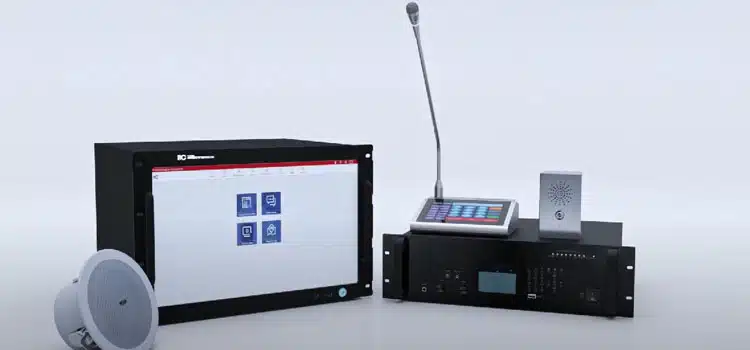
Types of Paging Systems: One-Way, Two-Way, IP, Wireless & Overhead
Table of Contents
- What Are the Different Types of Paging Systems?
- How Do Paging System Types Differ?
- Detailed Breakdown: All Types of Paging Systems
- Key Benefits by System Type
- Drawbacks & Limitations by Type
- Common Use Cases by Industry
- How to Choose the Right Type
- Comparison Table: All Paging System Types
- Cost by System Type
- Frequently Asked Questions
- Conclusion
- References
Introduction
With so many paging system options on the market, it's easy to feel overwhelmed. IP paging, wireless, overhead, analog, one-way, two-way — the terminology alone is enough to slow down any buying decision.
But here's the truth: choosing the wrong type of paging system for your facility can mean paying for features you'll never use or, worse, installing a system that can't scale with your business.
This guide cuts through the noise. Nexlar Security walks you through every major type of commercial paging system available in 2026 — how each one works, what it's best for, and where it falls short — so you can make a confident, informed decision for your Texas business.
📞 Not Sure Which Type Is Right for You?
Nexlar Security's licensed consultants offer a FREE on-site survey to evaluate your facility and recommend the perfect system — at zero cost to you. 👉 Book Your Free Site Survey Today
What Are the Different Types of Paging Systems?
Commercial paging systems can be broadly categorized in two ways:
By Technology: How the audio signal travels — analog (wired), IP (networked), or wireless (radio/Wi-Fi).
By Communication Direction: How messages flow — one-way (broadcast only) or two-way (interactive).
Most commercial installations combine elements of both categories. For example, an IP paging system can be configured for one-way broadcasting, two-way interaction, or both. Understanding both dimensions helps you match the right technology to your specific operational needs.
How Do Paging System Types Differ?
The fundamental differences between paging system types come down to three core factors:
Signal Transmission Method Analog systems use dedicated copper wiring. IP systems use your existing network infrastructure. Wireless systems use radio frequency or Wi-Fi signals. Each method affects installation cost, coverage flexibility, and long-term scalability.
Communication Capability One-way systems broadcast to listeners without any response mechanism. Two-way systems allow interactive communication between operator and endpoint — functioning more like an advanced intercom.
Integration Potential Analog systems operate as standalone units. IP systems integrate with networks, security platforms, access control, and automation systems. Wireless systems offer moderate integration depending on the platform.
These differences directly impact which type of system will deliver the best return for your facility's size, infrastructure, and communication goals.
Detailed Breakdown: All Types of Paging Systems
1. Overhead (Public Address) Paging Systems
How It Works Overhead paging systems — often called PA systems — use a central amplifier connected via dedicated speaker wiring to ceiling or wall-mounted speakers throughout a facility. An operator speaks into a microphone, and the audio plays through the speaker network almost instantly.
Best For Warehouses, manufacturing plants, retail stores, and any established facility that already has speaker infrastructure in place. They work well in environments where simplicity and reliability are the top priorities.
Key Strengths
- Simple, proven technology that has been reliable for decades
- Lower cost of entry compared to IP systems
- Works independently of any network infrastructure
Main Limitations
- Not easily scalable without adding new dedicated wiring
- Cannot be remotely managed
- Limited integration with modern security platforms
2. IP Paging Systems
How It Works IP paging systems transmit audio as digital data packets over your existing Ethernet or Wi-Fi network. IP audio endpoints — whether speakers, desktop units, or software clients — receive and play the audio in real time. These systems are managed through a web-based interface or dedicated software from any connected device.
Best For Modern offices, multi-floor buildings, educational campuses, healthcare facilities, and any multi-site Texas business that needs centralized control over multiple locations. IP paging pairs naturally with Nexlar's business security systems and access control platforms.
Key Strengths
- Fully scalable — add zones or endpoints without new infrastructure
- Remote management from any device
- Integrates with security cameras, access control, and fire alarms
- Superior audio quality
- Supports automated scheduling and event-triggered announcements
Main Limitations
- Higher upfront investment
- Dependent on network stability
- Requires IT coordination during setup
3. Wireless Paging Systems
How It Works Wireless paging systems transmit audio signals over radio frequencies (RF) or Wi-Fi, eliminating the need for dedicated speaker wiring. A wireless transmitter sends the signal to wireless-enabled speakers or receivers placed anywhere within range.
Best For Outdoor facilities, construction sites, large parking areas, temporary event setups, and older buildings where running new cable is prohibitively costly or disruptive. Nexlar's parking technology solutions often benefit from integrated wireless paging.
Key Strengths
- No dedicated cabling required
- Quick and flexible installation
- Ideal for outdoor and temporary deployments
- Can be repositioned or expanded without major work
Main Limitations
- Signal interference possible in high-density RF environments
- Audio quality can vary with wireless signal strength
- Battery-powered units require regular maintenance
- Not ideal as the sole solution for large permanent facilities
4. One-Way Paging Systems
How It Works One-way paging systems transmit audio from a single source — an operator or automated system — to one or more endpoints. The receiving parties cannot respond or communicate back through the same system.
Best For Any environment where the primary goal is mass broadcasting: retail stores, warehouses, hospitals, schools, and large office buildings. One-way systems are the most common type of commercial paging deployment worldwide.
Key Strengths
- Simple to operate — minimal training required
- Cost-effective for mass communication needs
- Ideal for shift announcements, product calls, and emergency alerts
- Can be automated for scheduled broadcasts
Main Limitations
- No feedback or confirmation from recipients
- Not suitable for environments requiring interactive communication
- Cannot replace intercoms at entry points or security desks
5. Two-Way Paging Systems
How It Works Two-way paging systems enable interactive audio communication between a central operator and one or more endpoints. Users at any endpoint can respond directly to a page, creating a real-time, back-and-forth exchange without needing a separate phone or radio.
Best For Security checkpoints, gated entry points, reception areas, and facilities where staff need to confirm receipt of messages or communicate back to dispatch. When paired with Nexlar's commercial intercom systems and automatic gates, two-way paging creates a comprehensive entry management solution.
Key Strengths
- Enables real-time interactive communication
- Reduces the need for separate radio or phone systems at key points
- Enhances security at entry and exit locations
- Supports two-way confirmation for critical operational processes
Main Limitations
- Higher complexity and cost than one-way systems
- Requires more training for staff to operate effectively
- Not necessary for simple broadcast-only communication needs
6. Analog Paging Systems
How It Works Analog paging systems use traditional analog audio signals transmitted over dedicated copper speaker wiring. A central analog amplifier receives the input and distributes audio to all connected speakers. These are the legacy systems found in many older commercial buildings throughout Texas.
Best For Smaller facilities with established analog infrastructure where the cost of upgrading to IP doesn't yet justify the investment. Analog systems are also a viable option for very simple, single-zone environments.
Key Strengths
- Cost-effective for small, simple installations
- No network dependency
- Mature, stable technology that technicians understand well
Main Limitations
- Not scalable without significant rewiring
- Cannot integrate with modern IP security platforms
- No remote management capabilities
- Audio quality is generally lower than IP systems
- Increasingly difficult to find replacement parts as the industry moves toward IP
7. Networked Multi-Zone Paging Systems
How It Works Multi-zone systems are advanced IP or hybrid paging platforms that manage multiple independent audio zones from a single, centralized interface. Each zone can receive different messages simultaneously or be addressed as part of a facility-wide broadcast — all from one dashboard.
Best For Large enterprise facilities, hospital campuses, university buildings, multi-floor office complexes, and multi-site Texas businesses. Nexlar's integrated security solutions frequently incorporate multi-zone paging as part of a comprehensive communication strategy.
Key Strengths
- Granular zone control across large, complex facilities
- Centralized management from a single interface
- Supports simultaneous broadcasts across different zones with different content
- Scales to virtually unlimited size
- Integrates with building management and security systems
Main Limitations
- Highest upfront cost
- Requires experienced design and installation
- Needs ongoing IT and maintenance support
Key Benefits by System Type
| System Type | Top Benefit |
|---|---|
| Overhead/Analog | Simple, reliable, low-cost entry |
| IP Paging | Scalability, integration, remote management |
| Wireless | Flexible, no cabling required |
| One-Way | Easy mass broadcasting |
| Two-Way | Interactive, real-time communication |
| Multi-Zone | Granular control across large facilities |
Drawbacks & Limitations by Type
Understanding the limitations of each type helps you avoid common pitfalls:
- Analog — Limited scalability and no smart integration make it a dead end for growing businesses.
- IP — Requires a stable, well-maintained network. Network outages can impact communication.
- Wireless — RF interference and signal variability can affect reliability in dense environments.
- One-Way — No feedback loop. You can't confirm that your message was received or acted upon.
- Two-Way — More training required. Overkill for simple broadcast-only scenarios.
- Multi-Zone — The most complex and expensive to design, install, and maintain. Requires expert involvement.
Common Use Cases by Industry
Here's how different industries across Texas typically deploy paging systems:
Warehouses & Distribution Centers — Overhead or IP paging for shift changes, safety announcements, and coordination across large floor spaces. Nexlar serves distribution centers throughout Texas.
Healthcare — Multi-zone IP paging for code alerts, staff calls, and patient communication in hospitals and medical campuses.
Schools & Universities — IP or analog paging for bell schedules, daily announcements, and emergency lockdowns across educational facilities.
Retail — One-way overhead paging for price checks, customer service calls, and store-wide announcements.
Government — Secure, multi-zone IP paging for public buildings and government facilities requiring reliable emergency communication.
Parking Facilities — Wireless or IP paging integrated with parking technology systems for visitor and staff communication.
HOA & Apartments — One-way or two-way paging for apartment complexes and HOA communities requiring building-wide communication.
How to Choose the Right Type of Paging System
Use this framework to guide your decision:
Start with your facility size. Small, single-floor facilities can do well with analog or basic overhead systems. Large, multi-zone, or multi-building facilities should go IP from the start.
Evaluate your existing infrastructure. Already have a solid IP network? Then an IP paging system is the smart, cost-efficient path. No network? Wireless or analog may be more practical short-term.
Define your communication goals. If you only need one-way broadcasting, a simple overhead system may be enough. If you need interactive communication at entry points, two-way capability is essential.
Think about integration. If you want your paging system to work with your access control systems or security cameras, you need an IP-based solution from the start.
Plan for growth. Don't just solve today's problem. Choose a system that will still serve your needs in five years as your business expands.
Consult a licensed expert. Nexlar's consultants conduct free on-site assessments to help you identify the right type, right design, and right budget for your specific facility.
Comparison Table: All Paging System Types
| Feature | Analog | IP | Wireless | One-Way | Two-Way | Multi-Zone |
|---|---|---|---|---|---|---|
| Wiring Required | Yes | Minimal | No | Depends | Depends | Minimal |
| Scalability | Low | High | Medium | Medium | Medium | Very High |
| Remote Management | No | Yes | Yes | No | Partial | Yes |
| Security Integration | No | Yes | Partial | No | Partial | Yes |
| Interactive Communication | No | Optional | Optional | No | Yes | Optional |
| Audio Quality | Good | Excellent | Good | Good | Good | Excellent |
| Installation Cost | Low | Medium–High | Medium | Low | Medium | High |
| Best Environment | Small Facilities | Enterprise | Outdoor | Any | Entry Points | Campus/Multi-Site |
Cost by System Type
Here's a general pricing overview for Texas commercial installations:
| System Type | Estimated Installation Range |
|---|---|
| Basic Analog Overhead | $1,500 – $5,000 |
| IP Paging System | $5,000 – $25,000 |
| Wireless Paging System | $3,000 – $15,000 |
| Two-Way Paging / Intercom System | $4,000 – $20,000 |
| Multi-Zone IP System (Enterprise) | $20,000 – $75,000+ |
Note: These are general estimates. The final cost depends on facility size, number of zones, integration requirements, and indoor vs. outdoor deployment. Nexlar provides a free, detailed quote after every on-site survey.
Let Nexlar Match You With the Right System
Our licensed team takes the guesswork out of choosing a paging system. We assess your facility, understand your goals, and recommend the exact type and design that fits your budget and future plans. 👉 Book Your Free On-Site Consultation Today
Frequently Asked Questions
What are the main types of paging systems?
The main types of commercial paging systems are analog overhead (PA) systems, IP paging systems, wireless paging systems, one-way paging systems, two-way paging systems, and networked multi-zone systems. Each type differs in how audio is transmitted, the level of interactivity supported, and scalability for large or growing facilities.
What is the difference between a one-way and two-way paging system?
A one-way paging system broadcasts audio from a central operator to listeners without any response capability. A two-way paging system enables interactive communication, allowing recipients to respond in real time. Two-way systems are commonly used at security checkpoints, gated entries, and reception desks.
What is an IP paging system?
An IP paging system transmits audio over an existing Ethernet or Wi-Fi network rather than dedicated speaker wiring. It supports remote management, zone-based broadcasting, integration with security platforms, and automated event triggers. IP systems are the preferred choice for modern, scalable commercial installations.
What type of paging system is best for a warehouse?
Warehouses typically benefit from overhead IP or analog paging systems with weatherproof horns or high-output speakers designed for loud industrial environments. IP systems offer better scalability and integration with safety and security platforms, making them the better long-term investment for large warehouse operations.
Can I upgrade from an analog to an IP paging system?
Yes. Many facilities upgrade from analog to IP paging by leveraging existing speaker infrastructure where possible and adding IP-compatible components or endpoints. Nexlar assesses your current setup and recommends the most cost-effective upgrade path during the free on-site consultation.
What type of paging system works outdoors?
Wireless paging systems and outdoor-rated IP paging systems work best in outdoor environments. They require weatherproof speakers or horn units rated for exposure to the elements. Texas heat and humidity make proper equipment selection especially critical for outdoor deployments.
How do I decide which type of paging system my business needs?
The best type depends on your facility size, existing infrastructure, communication goals, integration requirements, and budget. A licensed consultant like Nexlar can evaluate your specific situation and recommend the right type through a free on-site assessment.
Conclusion: The Right Type Changes Everything
Not all paging systems are created equal — and choosing the wrong type for your facility can cost you significantly more in the long run. Whether you're in a small retail store that needs basic overhead announcements or managing a multi-building campus that demands an enterprise IP platform, the right type of paging system makes all the difference.
The good news is that in 2026, Texas businesses have access to better, more affordable options than ever before. And with a licensed, experienced partner like Nexlar Security guiding the process, you don't have to figure it out alone.
Our team has helped over 1,000 Texas businesses across Houston, Dallas, San Antonio, Austin, Fort Worth, and San Marcos choose, design, and install the right communication systems for their unique needs.
Ready to find your match? Book a FREE on-site consultation with Nexlar today — our experts will walk you through every option and design a system built for your business.
References
- Texas Department of Licensing and Regulation (TDLR) – Low Voltage Licensing
- BICSI – ICT Infrastructure Standards and Best Practices
- NFPA 72 – National Fire Alarm and Signaling Code (2022 Edition)
- Telecommunications Industry Association (TIA) – IP Communications Standards
- Nexlar Security – Commercial Business Security Systems: nexlar.com/commercial-business-security-systems-installer
- Nexlar Security – Integrated Security Solutions: nexlar.com/integrated-security
Follow Us