

Austin’s dental and specialty dental market has expanded significantly over the past decade — driven by the metro area’s population growth, the expansion of DSO (Dental Support Organization) networks across Central Texas, and the buildout of specialty practices in growth corridors from Round Rock to Kyle and Buda.
Most of these dental offices manage patient records using practice management software running on local servers or workstation-based installations — Dentrix, Eaglesoft, Carestream, or similar platforms. The patient records in these systems — treatment histories, X-ray and imaging files, insurance data, appointment records — are Protected Health Information (PHI) under HIPAA. The servers or workstations storing them are within scope for HIPAA’s physical safeguard requirements.
And in the vast majority of Austin dental offices, those servers sit in an unlocked IT cabinet in a back room, accessible to anyone with physical access to that room — which often means the entire clinical staff.
That is a documented HIPAA physical safeguard gap. And it is the most common physical security finding in dental practice HIPAA risk assessments conducted across Texas. [1]
This guide covers what HIPAA actually requires for server rack and cabinet security in Austin dental clinics, why mechanical locks don’t satisfy that requirement, and what audit-logging electronic cabinet lock solutions look like for a dental practice environment.
🔒 Free Physical Security Assessment for Your Austin Dental Clinic
Nexlar Security evaluates physical PHI access control for Austin dental practices — server cabinet security, access restriction, and HIPAA audit documentation. 👉 Book Your Free Clinic Assessment
Local EMR Storage: The Physical Security Obligation That’s Easy to Miss
When dental practices transition to cloud-based EMR platforms, physical server security becomes less relevant — the patient data lives in the vendor’s data center, not in a local cabinet. But a significant portion of Austin’s dental practices, particularly longer-established offices and those using legacy practice management platforms, continue to run local server installations where the PHI is physically present on hardware in the office.
That local hardware — whether it’s a server rack in a dedicated IT room, a tower server in a utility closet, or a NAS (Network Attached Storage) device under a front desk counter — contains the complete patient record database. Access to that hardware is, in a meaningful sense, access to every patient’s protected health information.
HIPAA’s Security Rule doesn’t distinguish between PHI stored locally and PHI stored in the cloud when it comes to physical safeguard requirements. Both are within scope. [2] The covered entity — the dental practice — is responsible for controlling physical access to PHI regardless of where the hardware lives.
The practical implication for Austin dental offices with local servers: the server cabinet or server room requires physical access control that restricts access to authorized personnel, creates a documented record of who accessed it and when, and can demonstrate those controls in the event of an OCR (Office for Civil Rights) audit or a data breach investigation.
HIPAA Physical Safeguard Requirements for Server Racks and Cabinets
HIPAA’s Security Rule (45 CFR §164.310) establishes physical safeguard requirements for covered entities that apply directly to server hardware storing local PHI. [2]
§164.310(a)(1) — Facility Access Controls Requires policies and procedures to limit physical access to electronic information systems and the facilities in which they are housed. For a dental clinic with a local server, this means the server location must have physical access controls that limit access to authorized persons.
§164.310(a)(2)(iii) — Access Control and Validation Procedures Requires procedures to control and validate a person’s access to facilities based on their role or function. For server room or cabinet access, this means not everyone who can access the office has authorization to access the server — access is restricted to personnel whose role requires it (typically the IT administrator or designated IT staff).
§164.310(b) — Workstation Use Requires physical safeguards for all workstations that access electronic PHI. For server cabinets containing the PHI database, this provision supports restricting cabinet access to authorized users.
§164.310(d)(1) — Device and Media Controls Requires policies and procedures governing the receipt and removal of hardware and electronic media containing PHI. A server cabinet with audit-logging access control provides documentation of who had physical access to media in the server environment.
Taken together, these provisions require Austin dental clinics to: identify who is authorized to access server hardware, implement physical controls that enforce that authorization, and maintain records of access events for audit purposes.
A mechanical padlock on a server cabinet satisfies none of these requirements — it restricts access (to anyone with the key or combination) but creates no record, enforces no role-based authorization, and provides no audit trail. [3]
The Problem with Mechanical Cabinet Locks in Dental Offices
The standard approach to server cabinet security in most Austin dental offices is a mechanical lock — either the lock built into the cabinet door at manufacture, or an aftermarket hasp and padlock. This approach is common because it’s simple and inexpensive. It is also inadequate for HIPAA physical safeguard compliance in several specific ways.
No audit trail. A mechanical lock cannot record who opened it, when, or how long it was open. When a breach investigation or OCR audit asks “who had access to the server between March 15 and March 22?” the answer from a mechanical lock system is: anyone who had the key. That’s not a defensible access log.
No role-based restriction enforcement. A physical key has no understanding of role or authorization. If five people have a copy of the server room key, all five have equal access — regardless of whether their role authorizes them to access the server hardware. If an employee with a key changes roles or leaves the practice, key collection and lock-rekeying are required to maintain access control — which rarely happens consistently in a busy dental practice.
Keys are copied and transferred informally. In the real operational environment of a dental office, keys are copied for convenience, lent between staff members, and not consistently collected when employees leave. Over time, the population of people with physical access to the server cabinet expands beyond the documented authorized list without any record of the expansion.
No alert on unauthorized access attempts. A mechanical lock provides no notification when someone attempts to access the cabinet outside of normal hours or when an access pattern is unusual.
Audit-Logging Bluetooth Cabinet Locks: How They Work
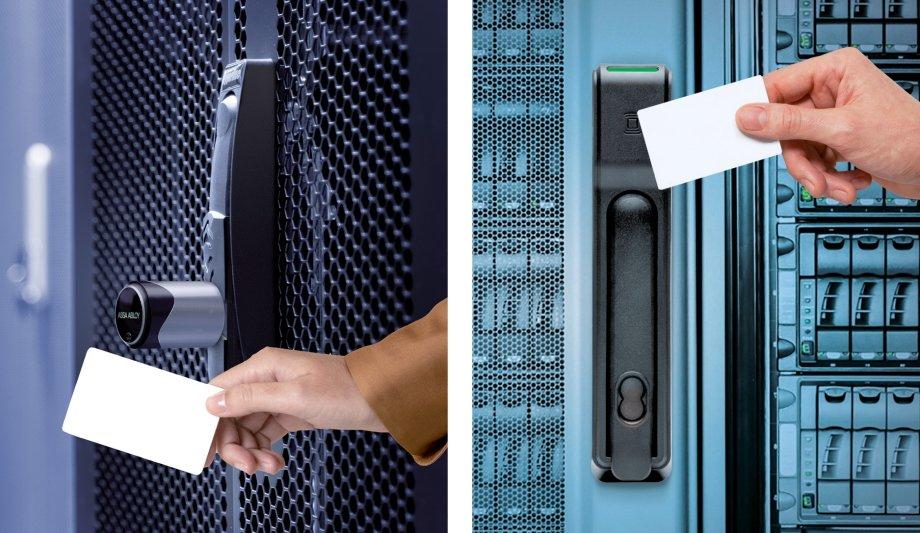
Electronic audit-logging cabinet locks — available from manufacturers including Digilock, Sievert Larson, American Lock’s electronic product line, and Allegion’s cabinet security offerings — replace mechanical cabinet locks with electronically controlled locking mechanisms that require a digital credential (Bluetooth phone, PIN code, or RFID card) for access and log every access event with a timestamp and credential identifier. [4]
The Bluetooth credential approach for dental office server cabinets:
The IT administrator or authorized staff member is enrolled in the cabinet lock’s management system with a Bluetooth credential on their smartphone. When they approach the server cabinet, they present their phone to the lock’s BLE reader — the lock validates the credential and releases the cabinet door. The event is logged: which credential, which cabinet, exact time of open and close.
For the dental practice owner or HIPAA Security Officer reviewing the access log, this provides the specific, named access history that HIPAA physical safeguard compliance requires: “Cabinet A was accessed by IT Administrator John Smith at 2:47 PM on March 18, and was closed at 2:54 PM.”
Multiple credential support: In dental practices where more than one authorized IT staff member exists, each is enrolled with their own unique credential. The access log distinguishes between them by credential — the practice can see not just that the cabinet was opened, but specifically which authorized person opened it.
Remote access management: Most Bluetooth audit-logging cabinet lock platforms are managed through a cloud portal or mobile app — the practice owner or HIPAA Security Officer can add or remove authorized users, pull access reports, and receive alerts for unusual access events from any device with internet access. When a staff member who had cabinet authorization leaves the practice, their credential is deactivated immediately without any physical hardware change at the cabinet.
Alert capability: Platforms with alert configuration can notify designated administrators when the cabinet is opened outside of defined business hours, when access is attempted with an unauthorized credential, or when the cabinet has been open for longer than a defined threshold — providing real-time awareness of unusual server cabinet access events.
Restricting Server Room Access to Designated IT Staff Only
For Austin dental clinics with a dedicated server room rather than a single cabinet, the physical access control requirement extends from the cabinet lock to the room itself.
The server room door — typically a standard interior door in most dental office configurations — should have electronic access control that restricts entry to designated IT staff, creates a timestamped access log, and allows immediate deactivation of any staff member’s access when their authorization changes.
This is the same access control technology applied in larger HIPAA-regulated environments — hospitals, multi-location physician practices — scaled to the single-door application of a dental clinic’s server room.
A PIN-based electronic lock on the server room door, with a unique PIN for each authorized person and a complete access log, provides the role-based restriction and documentation that HIPAA physical safeguards require — at a cost and installation complexity appropriate for a dental practice rather than a hospital.
For Austin multi-location DSO networks managing patient records across multiple Austin-area dental offices, a cloud-managed access control system covering server room doors at all locations provides centralized oversight of physical PHI access across the entire network — useful for both HIPAA compliance management and the operational security of a multi-practice organization.
Hardware Options for Austin Dental Clinic Server Cabinet Security
Digilock Coda and Aspire Series Widely deployed electronic cabinet lock platform with Bluetooth, RFID, and PIN credential options. The Digilock management platform (ASSA ABLOY subsidiary) provides cloud-based audit logging, user management, and alert configuration. Available in a range of cabinet lock form factors compatible with standard server rack cabinet hardware. [4]
Sievert Larson Electronic Cabinet Locks Provides electronic cabinet lock solutions with audit logging specifically marketed for HIPAA-regulated environments. PIN and RFID credential options. Access logs exportable in formats suitable for compliance documentation.
American Lock Electronic Padlocks For cabinets where an electronic lock in the cabinet door isn’t practical, electronic padlocks with Bluetooth or RFID credentials and audit logging provide the same access control and log functionality in a padlock form factor compatible with existing hasps.
Allegion (Schlage) Commercial Cabinet Locks Allegion’s commercial cabinet hardware line includes electronically controlled locks with OSDP support for integration into enterprise access control platforms — appropriate for larger DSO networks that want cabinet security integrated into the same access control platform as their facility doors.
Documentation for HIPAA Audits and OCR Investigations
The audit trail from an electronic cabinet lock system is the primary documentation that demonstrates HIPAA physical safeguard compliance for a dental practice’s server hardware.
When the OCR (Office for Civil Rights) investigates a breach notification or audits a covered entity, the physical safeguard review typically includes:
Who was authorized to access the server hardware? (Access control policy and authorization list)
What controls enforced that authorization? (Electronic lock system documentation)
What access events occurred during the period under review? (Access log export covering the relevant timeframe)
Were there any anomalous access events (unauthorized attempts, after-hours access)? (Alert log and incident records)
A dental practice that can produce these documents from its electronic cabinet lock management platform — with timestamped, named access records — is in a substantially better position in an OCR review than one that responds to physical safeguard questions with “we had a lock on the cabinet.”
Nexlar configures audit-logging cabinet lock systems for Austin dental clients with access log retention and export formats designed for HIPAA audit documentation purposes.
System Comparison Table
| Feature | Mechanical Cabinet Lock | Electronic Keypad Lock | Bluetooth Audit-Logging Lock |
|---|---|---|---|
| Named Access Log | No | Limited (if PIN is unique per user) | Yes — credential linked to named user |
| Remote User Management | No | No | Yes — cloud portal or app |
| Instant Access Revocation | No (rekeying required) | Yes (PIN deletion) | Yes (credential deactivation) |
| Alert on Unusual Access | No | No | Yes (configurable) |
| HIPAA Audit Log Export | No | Limited | Yes — timestamped, named |
| Multiple User Support | Key copies only | Multiple PINs | Individual credentials per user |
| Role-Based Authorization | No | Partial | Yes |
| Cost Per Cabinet | Low | Medium | Medium–High |
| Meets HIPAA Physical Safeguard Standard | No | Partial | Yes |
Cost and Pricing for Austin Dental Clinic Installations
| Installation Scope | Estimated Cost Range |
|---|---|
| Single Bluetooth Audit-Logging Cabinet Lock | $300 – $800 (hardware + setup) |
| Full Server Cabinet (3–6 racks, shared IT room) | $1,500 – $4,000 |
| Server Room Electronic Door Lock + Access Control | $1,200 – $3,000 |
| Multi-Location DSO (per location, cabinet + room) | $2,000 – $5,000 |
| HIPAA Physical Safeguard Assessment + Documentation | $1,500 – $3,500 |
Note: Exact costs depend on cabinet count, lock model selected, credential platform, and whether server room door access control is included. Nexlar provides itemized quotes after a free on-site clinic assessment.
💡 HIPAA-Compliant Server Cabinet Security for Austin Dental Clinics
Nexlar installs audit-logging cabinet locks and server room access control for Austin dental practices and DSO networks — with documentation packages suitable for HIPAA compliance review. 👉 Schedule Your Free Dental Clinic Assessment