

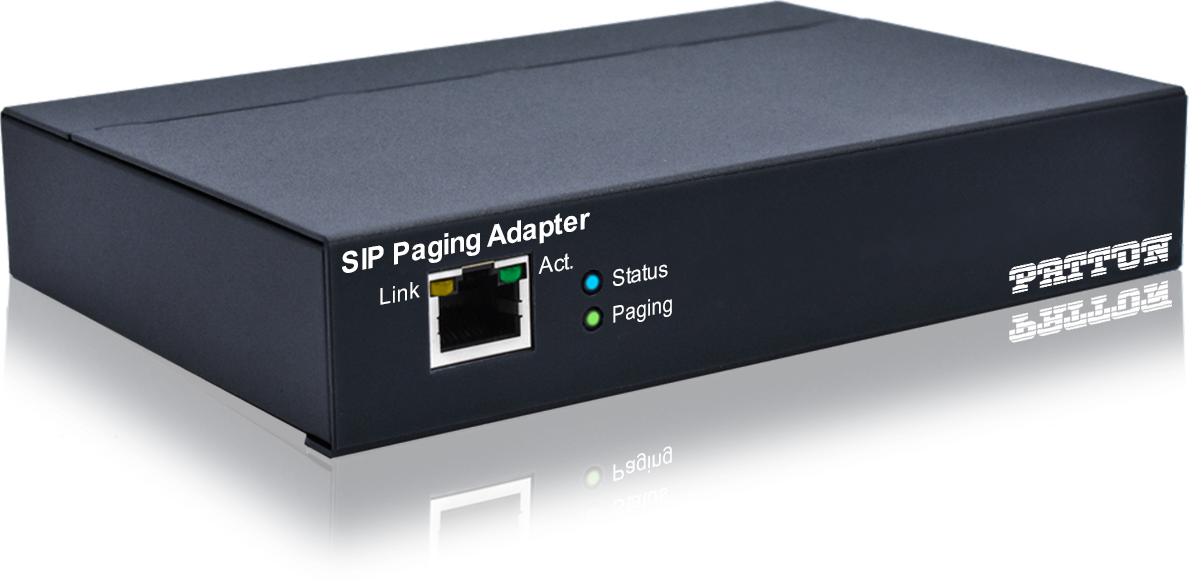
VoIP & SIP Paging Systems Explained
Table of Contents
- What Is a VoIP and SIP Paging System?
- How Does a VoIP/SIP Paging System Work?
- Types of VoIP and SIP Paging Systems
- Key Benefits of VoIP and SIP Paging
- Drawbacks and Limitations
- Industries and Use Cases
- How to Choose the Right VoIP Paging System
- VoIP/SIP Paging vs Traditional Paging: Comparison Table
- Cost and Pricing Overview
- Frequently Asked Questions
- Conclusion
- References
Introduction
Most businesses already have a VoIP phone system. What many don't realize is that the same infrastructure powering their desk phones can also power a facility-wide paging system — without adding a separate paging amplifier, without running dedicated speaker cables, and without managing two unconnected communication platforms.
VoIP and SIP paging systems bring your phone system and your overhead paging together on the same network, under the same management platform. The result is a more integrated, more efficient, and often more cost-effective communication setup than running both systems independently.
But VoIP paging is frequently misunderstood — confounded with standard IP paging, or oversimplified in ways that lead to poor implementation decisions. This guide from Nexlar Security breaks it down accurately and completely, so Texas businesses understand exactly what VoIP and SIP paging systems are, how they work, and whether they're the right fit for your facility.
📞 See If VoIP Paging Is Right for Your Setup
Nexlar Security offers FREE on-site consultations for Texas businesses. Our licensed team evaluates your existing phone infrastructure and recommends the best integrated paging solution. 👉 Book Your Free Site Survey Today
What Is a VoIP and SIP Paging System?
To understand VoIP paging, you first need to understand two foundational terms:
VoIP (Voice over Internet Protocol) is the technology that allows voice calls to be transmitted as digital data over an IP network — the same principle that allows your office phone to make calls over your internet connection rather than a traditional telephone line. Most modern business phone systems are VoIP-based.
SIP (Session Initiation Protocol) is the specific signaling protocol that most VoIP systems use to initiate, manage, and terminate communication sessions — whether that's a phone call, a video conference, or a paging broadcast. SIP is the language that VoIP endpoints use to establish connections with each other.
A VoIP/SIP paging system integrates overhead paging functionality directly into your existing VoIP phone infrastructure using SIP. Instead of a separate standalone paging amplifier, your existing IP-PBX (phone system server) manages paging alongside regular phone calls. Paging-capable SIP endpoints — ceiling speakers, IP horns, desktop speakers, or multicast-enabled devices — register with your phone system just like desk phones do. When a staff member dials a paging extension from their desk phone, the phone system initiates a SIP session to the paging group and broadcasts the audio through all registered endpoints simultaneously.
The key distinction from standard IP paging is integration depth. A standalone IP paging system is a separate platform that happens to run on the same network as your phone system. A SIP paging system is directly integrated into your phone system — using the same dial plan, the same management interface, and the same extensions as your regular phone infrastructure.
How Does a VoIP/SIP Paging System Work?
Understanding the technical flow helps you make better implementation decisions:
Step 1 – Extension Dialing or Software Trigger A staff member dials a paging extension from any SIP phone on the network. Alternatively, a software interface, scheduled task, or automated system event initiates the page programmatically through the PBX.
Step 2 – PBX Processing The IP-PBX (the server running your VoIP phone system — such as a platform running Asterisk, FreePBX, Cisco Unified Communications Manager, or a hosted VoIP service) receives the call to the paging extension and processes it according to the dial plan rules configured for that extension.
Step 3 – Multicast or Unicast Audio Delivery The PBX either sends the audio as a multicast stream — a single transmission that all paging endpoints on the designated multicast group receive simultaneously — or as individual unicast connections to each registered paging device. Multicast is more efficient for large numbers of endpoints. Unicast supports call features like zone selection but creates more network traffic at scale.
Step 4 – SIP Endpoint Audio Playback SIP-capable ceiling speakers, IP horns, desktop paging units, or analog telephone paging adapters receive the audio stream and play it through their built-in amplifiers. Some SIP paging endpoints also support auto-answer, priority paging, and pre-announcement tones.
Step 5 – Call Completion The page completes when the originator hangs up. The paging extension returns to idle state, ready for the next page. Event logging in the PBX records the time, originating extension, and paging group for audit purposes.
Types of VoIP and SIP Paging Systems
SIP Multicast Paging
The most common VoIP paging configuration for commercial facilities. The PBX sends a single multicast audio stream to a designated network multicast address. All SIP endpoints configured to listen on that multicast address receive the stream simultaneously. Highly efficient for large deployments because the network only carries one audio stream regardless of the number of speakers.
SIP Unicast Paging
The PBX establishes individual SIP sessions with each paging endpoint. More network-intensive than multicast for large deployments, but supports more granular call control features — including the ability to direct pages to specific zones or individual endpoints using standard dial plan logic.
Analog Telephone Paging Adapters
For facilities with legacy analog overhead paging amplifiers, ATA (Analog Telephone Adapter) devices can bridge the existing analog system to a VoIP PBX — allowing pages to be initiated from SIP phones while the audio plays through the existing analog speaker infrastructure. This is a cost-effective transition option for facilities not yet ready for a full IP speaker replacement.
Hosted VoIP Paging
Some cloud-based VoIP platforms support SIP paging extensions that integrate with on-premise or cloud-connected SIP paging controllers. This configuration is particularly useful for businesses using a hosted VoIP service (rather than an on-premise PBX) who want overhead paging capability without deploying a separate on-site paging server.
Integrated Unified Communication Paging
Advanced enterprise deployments integrate paging directly into unified communications platforms — allowing paging to be initiated from softphone applications on computers and mobile devices, in addition to traditional desk phones. These platforms also support integration with access control systems and security cameras for automated security-triggered paging.
Key Benefits of VoIP and SIP Paging
Leverages Your Existing Phone Infrastructure If your business already uses a VoIP phone system, a SIP paging system eliminates the need for a separate standalone paging platform, a separate amplifier, and separate management software. Your phone system becomes the paging controller. This significantly reduces both upfront equipment costs and ongoing management complexity.
Page from Any Desk Phone or Softphone With SIP paging integrated into your dial plan, any staff member with a registered phone extension can initiate a page by simply dialing the paging extension — from their desk phone, a softphone on their laptop, or a mobile client. No specialized paging microphone or separate control panel is required.
Single Management Platform Managing your phone system and your paging system from a single interface reduces administrative overhead, simplifies troubleshooting, and creates a more coherent communication infrastructure. Extension assignments, paging zones, and user permissions are all managed in one place.
Highly Scalable Over Your Existing Network SIP paging endpoints connect to your existing network — no dedicated paging cabling required. Adding a new speaker to a new zone is as simple as connecting a SIP speaker to the nearest network port and registering it with the PBX.
Supports Zone-Based Paging Through Dial Plan By configuring different paging extensions for different zones in your PBX dial plan, staff can page specific areas of the facility using their standard desk phone without any additional hardware or software. Zone-based paging through a familiar phone interface is intuitive and requires minimal training.
Integration with Security Systems When your VoIP PBX platform supports API integration, automated paging triggers can be configured based on events from Nexlar's access control systems or fire alarm platforms — enabling coordinated emergency responses without manual operator intervention.
Detailed Call Logging for Compliance VoIP phone systems maintain detailed call records — including all paging events — as part of their standard CDR (Call Detail Records) logging. This creates an automatically maintained audit trail of all paging activity, which is valuable for compliance and post-incident review.
Drawbacks and Limitations
Requires a Compatible VoIP PBX SIP paging works best with an on-premise or managed VoIP PBX that supports multicast audio and SIP endpoint registration. Some basic hosted VoIP plans don't support the multicast paging features needed for efficient large-scale deployments. Compatibility must be verified before designing a SIP paging system.
Network Quality is Critical VoIP paging is highly sensitive to network latency, packet loss, and jitter. Poor network quality results in choppy, delayed, or unintelligible audio — which is unacceptable in operational and emergency communication. Quality of Service (QoS) configuration on your network switches is essential for reliable VoIP paging performance.
PBX Single Point of Failure If your VoIP PBX experiences an outage, your paging system goes down with it. For business-critical paging, backup power for the PBX server and network infrastructure is essential. Redundant PBX configurations or cloud failover should be evaluated for high-availability requirements.
Requires IT Expertise for Setup and Maintenance Configuring SIP multicast paging, QoS settings, VLAN segmentation, and dial plan logic requires VoIP and networking expertise. Businesses without dedicated IT staff should work with a qualified integrator like Nexlar who manages both the paging and network configuration.
SIP Endpoint Compatibility Must Be Verified Not all IP ceiling speakers support SIP registration or multicast audio properly. Compatibility between your specific PBX platform and your chosen SIP paging endpoints must be verified during the system design phase — not discovered after installation.
Industries and Use Cases
Corporate Offices with VoIP Phone Systems The primary use case for SIP paging. Businesses already running a VoIP phone system gain overhead paging capability by adding SIP ceiling speakers and configuring paging extensions — with minimal additional infrastructure investment.
Multi-Floor Office Buildings SIP paging integrates naturally with multi-floor office deployments where different floors can be configured as separate paging zones — addressable individually from any desk phone on the network.
Healthcare Facilities Hospitals and clinics using VoIP phone systems can extend their communication infrastructure to include overhead paging for code alerts, staff calls, and emergency announcements through the same SIP platform. Nexlar's healthcare security solutions incorporate integrated paging as part of a comprehensive communication strategy.
Educational Institutions Schools using VoIP communications can leverage SIP paging for bell schedules, daily announcements, and emergency lockdown alerts through the same system. Nexlar's educational security systems frequently include integrated VoIP paging deployments.
Government Facilities Government buildings with existing VoIP infrastructure can extend it with SIP paging for staff communication and emergency protocols — reducing the total number of communication systems to manage.
Warehouses Using VoIP Phone Systems For warehouses already running VoIP phones, SIP paging adds operational announcement capability across the floor without requiring a separate paging infrastructure investment. Nexlar serves warehouse and distribution facilities across Texas.
How to Choose the Right VoIP Paging System
Verify PBX Compatibility First Before specifying any SIP paging equipment, confirm that your VoIP PBX platform supports SIP endpoint registration, multicast audio transmission, and the paging zone configuration you need. Different PBX platforms have different capabilities and limitations.
Assess Network Readiness Verify that your network infrastructure supports the QoS and VLAN configuration required for reliable VoIP audio. A network that handles data traffic fine may still deliver poor VoIP audio quality without proper QoS configuration — especially in facilities with high network utilization.
Select Compatible SIP Paging Endpoints Choose SIP ceiling speakers, desktop speakers, or horn units from manufacturers with proven compatibility with your PBX platform. Don't assume compatibility — verify it with your installer before procurement.
Plan Your Zone Architecture Map your paging zones and design the dial plan logic before any equipment is installed. Each zone should map to a logical paging extension that staff can easily remember and use.
Consider Audio Needs for Your Environment Standard SIP ceiling speakers work well in office environments. Loud industrial spaces, high-ceiling warehouses, and outdoor areas require higher-output speakers or horn units designed for those conditions.
VoIP/SIP Paging vs Traditional Paging: Comparison Table
| Feature | VoIP/SIP Paging | Analog Overhead | Standalone IP Paging |
|---|---|---|---|
| Integrates with Phone System | Yes | No | Partial |
| Initiate Page from Desk Phone | Yes | No | No (without SIP) |
| Separate Paging Controller Needed | No | Yes | Yes |
| Network Required | Yes | No | Yes |
| Multicast Zone Support | Yes | Limited | Yes |
| Remote Management | Yes | No | Yes |
| Security System Integration | Yes | No | Yes |
| Dedicated Speaker Cabling | No | Yes | No |
| QoS Configuration Required | Yes | No | Yes |
| Audio Quality | Excellent | Good | Excellent |
| Upfront Cost | Low – Medium | Low | Medium – High |
| Best For | VoIP-enabled offices | Simple small facilities | Purpose-built paging |
Cost and Pricing Overview
| Configuration | Estimated Cost Range |
|---|---|
| SIP Paging Extension + 4–8 SIP Speakers | $2,000 – $7,000 |
| Mid-Size SIP Paging (8–20 speakers) | $6,000 – $18,000 |
| Analog-to-SIP Bridge (ATA adapter) | $500 – $2,500 |
| Enterprise SIP Paging (20+ speakers) | $15,000 – $40,000 |
Note: These estimates assume an existing compatible VoIP PBX is in place. If a VoIP phone system needs to be installed or upgraded as part of the project, additional costs apply. Nexlar provides fully itemized quotes after every free on-site assessment.
💡 Already Have a VoIP System? Paging May Be Easier Than You Think
Nexlar evaluates your existing VoIP infrastructure and designs a SIP paging solution that maximizes your current investment — often at a lower cost than a standalone paging system. 👉 Schedule Your Free On-Site Consultation Today
Frequently Asked Questions
Q: What is a VoIP paging system?
A: A VoIP paging system uses Voice over Internet Protocol (VoIP) technology to broadcast overhead audio announcements through a business's existing IP phone infrastructure. Instead of a separate standalone paging amplifier, the VoIP phone server (PBX) manages paging alongside regular phone calls. Staff initiate pages by dialing a paging extension from any desk phone on the network, and the audio plays through SIP-capable ceiling speakers registered with the phone system.
Q: What is SIP and how does it relate to paging?
A: SIP stands for Session Initiation Protocol. It is the signaling protocol used by most VoIP phone systems to establish, manage, and terminate communication sessions — including phone calls and paging broadcasts. In a SIP paging system, ceiling speakers and other audio endpoints register with the VoIP PBX as SIP devices. When a paging extension is dialed, the PBX uses SIP to initiate an audio session to all endpoints in the paging group simultaneously.
Q: Is VoIP paging the same as IP paging?
A: Not exactly. IP paging is a broader term that refers to any paging system that transmits audio over an IP network. VoIP/SIP paging specifically refers to paging systems integrated directly into a VoIP phone infrastructure using SIP protocol. All VoIP paging systems are IP paging systems, but not all IP paging systems are VoIP/SIP systems — some use proprietary IP protocols or dedicated paging controllers that operate independently of a phone system.
Q: Do I need a VoIP phone system to use SIP paging?
A: Yes. SIP paging requires a compatible VoIP PBX that supports SIP endpoint registration and multicast or unicast audio delivery to paging groups. If your business uses a traditional analog phone system, you would need to either upgrade to VoIP or use an ATA (Analog Telephone Adapter) to bridge your existing phone system to a SIP paging controller.
Q: What is multicast paging and why does it matter?
A: Multicast paging sends a single audio stream over the network that all paging endpoints in a designated group receive simultaneously — rather than sending separate audio streams to each endpoint individually (unicast). Multicast is significantly more efficient for large deployments because the network carries only one audio stream regardless of how many speakers are playing. It also reduces latency and ensures all speakers in a zone receive the audio at the same time.
Q: Can I page specific zones using my desk phone with a SIP paging system?
A: Yes. Zone-based paging is configured through the VoIP PBX dial plan by assigning different paging extensions to different zones or speaker groups. Staff dial the extension for the specific zone they want to reach — such as dialing one extension for Warehouse A and a different extension for the office floor. No additional hardware or specialized paging hardware is needed beyond a standard desk phone.
Q: What network configuration is required for VoIP paging?
A: Reliable VoIP paging requires Quality of Service (QoS) configuration on your network switches to prioritize voice traffic over data traffic. VLAN segmentation for voice and data traffic is also recommended to reduce interference and improve audio quality. Multicast paging additionally requires that your network switches are configured to support IP multicast routing — specifically IGMP snooping — so that multicast audio streams are delivered only to the switches and ports where paging endpoints are connected.
Conclusion: VoIP Paging Turns Your Phone System into a Complete Communication Platform
For businesses that already operate a VoIP phone system, SIP paging is one of the most cost-effective ways to add professional, zone-controlled overhead paging capability. It leverages infrastructure you've already invested in, eliminates the need for a separate paging platform, and gives every staff member with a desk phone the ability to initiate a facility-wide or zone-specific page with a single dial.
The key to a successful VoIP paging deployment is getting the technical foundation right — PBX compatibility, network QoS configuration, SIP endpoint selection, and zone architecture. These are not steps to be skipped or improvised. They require the expertise of an experienced integrator who understands both VoIP telephony and commercial paging systems.
Nexlar Security designs and installs integrated VoIP paging, IP paging, and commercial communication systems for Texas businesses across Houston, Dallas, San Antonio, Austin, Fort Worth, and San Marcos. Our licensed team (License# B14634) manages the full scope — from network readiness assessment and PBX integration to speaker installation, zone configuration, and long-term support.
Book your FREE on-site consultation today and find out how VoIP paging can transform your existing phone infrastructure into a complete, integrated communication platform.
References
- Texas Department of Licensing and Regulation (TDLR) – Low Voltage Contractor Licensing
- RFC 3261 – SIP: Session Initiation Protocol (IETF Standard)
- RFC 3550 – RTP: Real-Time Transport Protocol for Audio Delivery
- IEEE 802.1Q – VLAN and Network Segmentation Standards
- BICSI – IP Communications and Network Infrastructure Standards
- Nexlar Security – Commercial Security Systems: www.nexlar.com
- Nexlar Security – Integrated Security Solutions: nexlar.com/integrated-security
- Nexlar Security – Low Voltage Cabling: nexlar.com/cabling-company
Follow Us